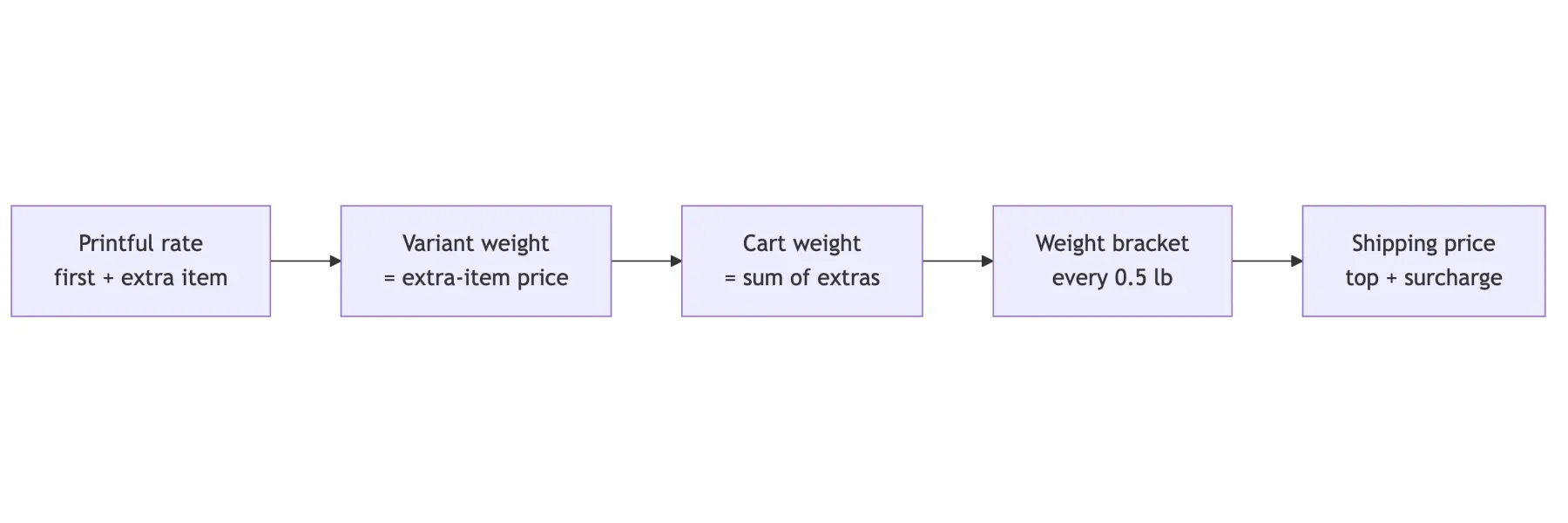
A client sells print-on-demand merch inside artists' own Shopify stores. Printful prints and ships it, and Printful charges per item: a t-shirt to the US costs $4.95 for the first one and $2.20 for each extra one. The first artist store I set up charged one flat rate per order, so every cart with more than one shirt lost money.
The obvious fix is carrier-calculated shipping: at checkout Shopify asks our app, and we return Printful's live rate for the exact cart. The store is on the Basic plan, and Basic doesn't offer that at all, not even as a paid add-on. So checkout can't talk to us. Whatever we want has to be prepared before the fan opens the cart.
Weight is a free field
Shopify still calculates rates per shipping profile, and a profile can use weight brackets. Printful ships the goods, so the weight on these variants is never used for a real label. That makes it a free number field that Shopify adds up for us.
flowchart LR
    A["Printful rate<br/>first + extra item"] --> B["Variant weight<br/>= extra-item price"]
    B --> C["Cart weight<br/>= sum of extras"]
    C --> D["Bracket<br/>every 0.5 lb"]
    D --> E["Price<br/>top + surcharge"]
Each variant gets a weight equal to its extra-item price, so a t-shirt weighs 2.20 lb. The profile gets brackets every 0.5 lb, and each bracket costs its upper bound plus one fixed surcharge: first minus extra, $2.75 for a t-shirt. We always round up, so the store never charges less than Printful.
Only the merch goes into this separate profile. The artist's own products, like vinyl, keep their own shipping rules, and Shopify adds both prices into one line at checkout.
Ten rows of maths before any code
Before writing a line of code I put the idea in a spreadsheet, with Printful's real t-shirt rates and an estimate for hoodies (first $8.79, extra $2.70), plus the $0.40 holiday surcharge per item. The difference column is what the fan pays minus what Printful charges.
| Cart | Weight lb | Fan pays | Printful | Difference |
|---|---|---|---|---|
| 1 tee | 2.60 | $5.75 | $5.35 | +0.40 |
| 2 tees | 5.20 | $8.25 | $7.95 | +0.30 |
| 3 tees | 7.80 | $10.75 | $10.55 | +0.20 |
| 1 hoodie | 3.10 | $6.25 | $9.19 | -2.94 |
| tee + hoodie | 5.70 | $8.75 | $11.79 | -3.04 |
| 2 hoodies | 6.20 | $9.25 | $12.29 | -3.04 |
T-shirt carts look great: a few cents over Printful's price. Every cart with a hoodie loses about $3. The reason is the single surcharge. A weight only carries one number per product, but Printful's price has two parts, and the gap between first and extra is $2.75 for a shirt and $6.09 for a hoodie. Raise the surcharge to cover hoodies and shirt carts pay about $3.30 too much.
Put the rule in a spreadsheet with formulas before you build it. Ten rows found the flaw that a happy-path test order would have hidden.
What comes next
The parts that don't depend on this choice can be built now: the app creates the separate profile and adds every synced variant to it, and a small job fetches Printful's real rates daily, so the estimates go away. The surcharge rule waits for a decision with the client. The options are a higher surcharge with some margin on shirts, or folding part of the hoodie's first-item cost into its weight.
The design took an afternoon, and most of the value came from the boring part: a table with formulas and real numbers. Next time I would build that table first, before drawing diagrams, because it answers whether the idea works before anyone falls in love with it.

Related notes



Merch shirts on a 3D dress form, built headless in Blender
In one afternoon, a client's flat Shopify mockups became shirts you can turn round in the browser. The hard part was not the 3D. It was a sleeve that looked like a cape.
SignNow MCP Server: E-Signatures Straight from Claude Code
I open-sourced an MCP server that brings SignNow e-signatures into Claude Code. Upload documents, send signing invites, track status, and download signed PDFs — all without leaving your terminal.