
SignNow MCP Server: E-Signatures Straight from Claude Code
I open-sourced an MCP server that brings SignNow e-signatures into Claude Code. Upload documents, send signing invites, track status, and download signed PDFs — all without leaving your terminal.
Key takeaways
- The signnow-mcp server exposes 11 tools covering the full document signing lifecycle.
- Natural language replaces API calls: upload, sign, and track documents from the terminal.
- SignNow sandbox provides 2,000 free signature invites for development and testing.
A few weeks ago I published a deep dive on integrating SignNow e-signatures into a Django application. That article covered the full server-side integration — OAuth2, document uploads, Celery tasks, webhooks — everything you need for a production signing workflow.
But I kept coming back to the same thought: what if you didn't need a web app at all? What if you could upload a contract, send it for signing, and check its status without ever leaving your terminal?
That's exactly what I built. Today I'm open-sourcing signnow-mcp — a Model Context Protocol server that brings airSlate SignNow's e-signature capabilities directly into Claude Code.
What is MCP?
The Model Context Protocol (MCP) is an open standard that lets AI assistants like Claude interact with external tools and services. Think of it as a plugin system — you register an MCP server, and Claude gains new abilities.
In my case, those abilities are e-signatures.
What the server does
The signnow-mcp server exposes 11 tools that cover the full document lifecycle:
| Tool | What it does |
|---|---|
upload_document | Upload a PDF to SignNow |
get_document | Get document details and signing status |
list_documents | List all documents in the account |
download_signed_document | Download a signed PDF locally |
send_signing_invite | Send a freeform e-signature invite |
send_role_based_invite | Send a role-based invite with field assignments |
cancel_invite | Cancel pending signing invites |
add_signature_field | Add a signature field to a document |
list_templates | List all document templates |
create_from_template | Create a document from a template |
register_webhook | Register a webhook for document events |
Once connected, you interact with these tools through natural language. No API calls, no curl commands, no switching between browser tabs.
How it looks in practice
Here's what it looks like when you ask Claude Code to list your SignNow documents:
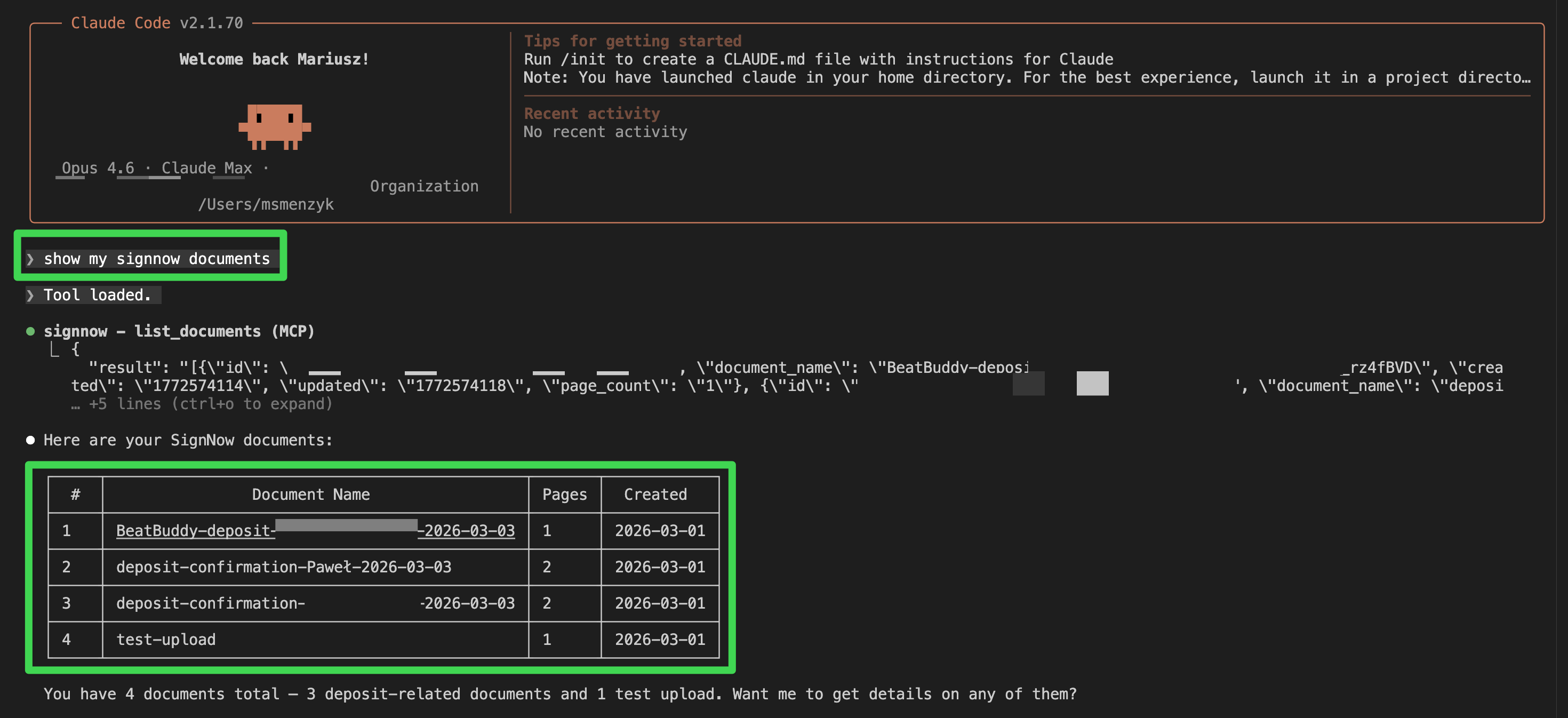
Claude calls the list_documents tool behind the scenes and presents the results in a clean table. You can then follow up with natural language — "download the first one", "send document #2 to [email protected] for signing", or "what's the status of the deposit confirmation?".
Setting it up
1. Get SignNow API credentials
- Create a SignNow account
- Go to API > Applications and create an application
- Note your
client_idandclient_secret - Base64-encode them:
echo -n "client_id:client_secret" | base64
2. Clone and install
git clone https://github.com/musictechlab/signnow-mcp.git
cd signnow-mcp
cp .env.example .env
# Edit .env with your credentials
poetry install
3. Register with Claude Code
The quickest way:
claude mcp add signnow -- poetry -C /path/to/signnow-mcp run python -m signnow_mcp.server
Or add it manually to your MCP configuration:
{
  "signnow": {
    "type": "stdio",
    "command": "poetry",
    "args": ["-C", "/path/to/signnow-mcp", "run", "python", "-m", "signnow_mcp.server"],
    "env": {
      "SIGNNOW_API_BASE_URL": "https://api.signnow.com",
      "SIGNNOW_BASIC_AUTH": "your-base64-encoded-credentials",
      "SIGNNOW_USERNAME": "[email protected]",
      "SIGNNOW_PASSWORD": "your-password"
    }
  }
}
Use the sandbox environment (https://api-eval.signnow.com) for testing. SignNow provides 2,000 free signature invites in sandbox mode.
4. Start using it
Once configured, just talk to Claude:
- "Upload contract.pdf to SignNow and send it to [email protected] for signing"
- "Check the signing status of document abc123"
- "List all my SignNow documents"
- "Download the signed version of the NDA"
- "Create a new document from the deposit template and send it to the client"
Why I built this
I use SignNow for sending contracts, NDAs, and deposit confirmations as part of the BeatBuddy onboarding flow. My Django integration handles the automated pipeline, but there are always ad-hoc tasks — checking a document's status, resending an invite, downloading a signed copy for the records.
Before the MCP server, that meant logging into the SignNow dashboard or writing one-off API calls. Now it's a single sentence in Claude Code.
This pattern — wrapping a third-party API as an MCP server — works for any service with a REST API. If you find yourself repeatedly switching to a web dashboard to do something, consider building an MCP server for it.
Sandbox vs. production
SignNow provides separate environments for testing and production:
| Environment | API URL | App URL |
|---|---|---|
| Sandbox | https://api-eval.signnow.com | https://app-eval.signnow.com |
| Production | https://api.signnow.com | https://app.signnow.com |
Never use production credentials for development. The sandbox environment is free and gives you 2,000 signature invites to test with.
Related resources
- GitHub: musictechlab/signnow-mcp — the source code
- Integrating SignNow E-Signatures into Your Django Application — my deep dive on the server-side integration
- Querying Bandcamp Revenue with Natural Language — another MCP server I built, this time for music revenue analytics
- Model Context Protocol specification — the MCP standard
- SignNow API documentation — official API reference
FAQ
What is the SignNow MCP server?
It is an open-source Model Context Protocol server that connects airSlate SignNow's e-signature API to Claude Code and other MCP-compatible clients. It lets you manage documents, send signing invites, and download signed PDFs directly from your terminal.
Is this an official SignNow product?
No. This is a side project of mine. It is not affiliated with or endorsed by airSlate SignNow.
What tools does the server provide?
The server exposes 11 tools: upload_document, get_document, list_documents, download_signed_document, send_signing_invite, send_role_based_invite, cancel_invite, add_signature_field, list_templates, create_from_template, and register_webhook.
Can I use this with clients other than Claude Code?
Yes. Any MCP-compatible client can use this server. Claude Code is the primary client I built it for, but the MCP protocol is open and supported by a growing number of tools.
Cover: Photo by Vitaly Gariev on Unsplash
A quick introduction to profit sharing implementation
My company does not offer any employee benefits. Learn how we implemented a simple profit sharing system and whether it's worth considering for your organization.
Smart Home on a Budget: BLE Window Sensors with Two Pico Ws and MicroPython
How I built a wireless window monitoring system using two Raspberry Pi Pico Ws, reed switches, and BLE — with async MicroPython, aioble, and zero cloud dependencies.