Querying Bandcamp Revenue Reports with Natural Language — Meet mtl-bandcamp-mcp
An open source MCP server that turns Bandcamp CSV exports into queryable dashboards. Ask about artist splits, fee breakdowns, and top sellers — no spreadsheet needed.
Key takeaways
- Query Bandcamp revenue CSVs with natural language, no spreadsheets or pivot tables needed.
- Five tools cover dashboard summaries, artist splits, top sellers, and catalog item lookups.
- Handles Bandcamp's UTF-16 encoding transparently with automatic fallback to UTF-8.
- MIT licensed and open source, installable with Poetry and Claude Code in under 5 minutes.
Every music label running on Bandcamp gets monthly CSV revenue reports. These files contain everything: gross revenue, net payouts, fee breakdowns, artist splits, and catalog details. But opening them in a spreadsheet means manual filtering, pivot tables, and context switching. I built mtl-bandcamp-mcp so you can query your Bandcamp earnings using natural language, without leaving the terminal.
All artist names, revenue figures, and catalog numbers in this article are fictional. I use fake data throughout to demonstrate the tool's capabilities.
Why I Built This
At the agency I ran at the time, I built MusicData Lab - a music distribution and analytics product. As part of that platform, I wrote an adapter that ingests Bandcamp revenue reports into the data pipeline. It is not something I work on daily - Bandcamp is one of many data sources - but when a new CSV export arrives, I need quick answers without opening a spreadsheet. An MCP server turned out to be the perfect fit: it lets me query reports on demand and could eventually help me integrate and debug the adapter within the broader data pipeline:
See totals, margins, and fee breakdowns at a glance.
Revenue grouped by artist with share percentages.
Rank items by net revenue, gross revenue, or quantity sold.
Full detail for any catalog number including UPC, ISRC, and region.
Since I already use Claude Code for development, building an MCP server was the natural choice. I took a similar approach with my AI-powered analytics dashboard, where business users query streaming royalty data in plain English and get interactive charts back.
The Tools
mtl-bandcamp-mcp exposes five tools:
List available Bandcamp CSV report files in the configured reports directory.
Dashboard summary with totals, net margin, and a full fee breakdown by category.
Revenue grouped by artist showing quantity, gross, net, and share of total.
Top-selling items sorted by net revenue, gross revenue, or quantity.
Full detail for a specific catalog number: UPC, ISRC, region, all fees, and net revenue.
Dashboard Fields
Summary metrics
| Metric | Description |
|---|---|
| Items sold | Total quantity across all line items |
| Unique artists | Number of distinct artists in the report |
| Gross revenue | Total revenue before deductions |
| Net revenue | Revenue after all fees and taxes |
| Net margin | Net as a percentage of gross |
Fee breakdown
| Fee type | Description |
|---|---|
| Taxes | VAT and other taxes collected |
| Bandcamp share | Bandcamp's assessed revenue share |
| Collection society | Royalty collection society share |
| Payment processing | Payment processor fees |
| Shipping | Physical goods shipping costs |
Item detail
| Field | Description | Example |
|---|---|---|
| Cat no. | Catalog number | "MDL-2939" |
| UPC | Universal Product Code | "5060000000001" |
| ISRC | International Standard Recording Code | "GBAP01900028" |
| Item type | Track, album, or merch | "track" |
| Region | Buyer's region | "United Kingdom" |
How It Works in Practice
Once installed, you just talk to Claude Code. No spreadsheet formulas, no pivot tables, no context switching.
Viewing the dashboard
Ask Claude for a summary:
> Show me a summary of my latest Bandcamp revenue report
Claude finds the most recent CSV and returns a formatted dashboard:
Report: bandcamp-rev-report-2026-q1.csvPeriod: 2026-01-01 to 2026-03-31
| Metric | Value |
|---|---|
| Items sold | 847 |
| Line items | 312 |
| Unique artists | 24 |
| Gross revenue | 12,450.00 GBP |
| Total deductions | 3,290.75 GBP |
| Net revenue | 9,159.25 GBP |
| Net margin | 73.6% |
Checking artist splits
> Which artists earned the most this quarter?
Claude groups revenue by artist and shows each one's share:
| Artist | Items | Qty Sold | Gross | Net | Share |
|---|---|---|---|---|---|
| Solar Cole | 3 | 18 | 167.27 GBP | 129.38 GBP | 53.9% |
| The Fox Alliance | 1 | 6 | 64.55 GBP | 53.11 GBP | 22.1% |
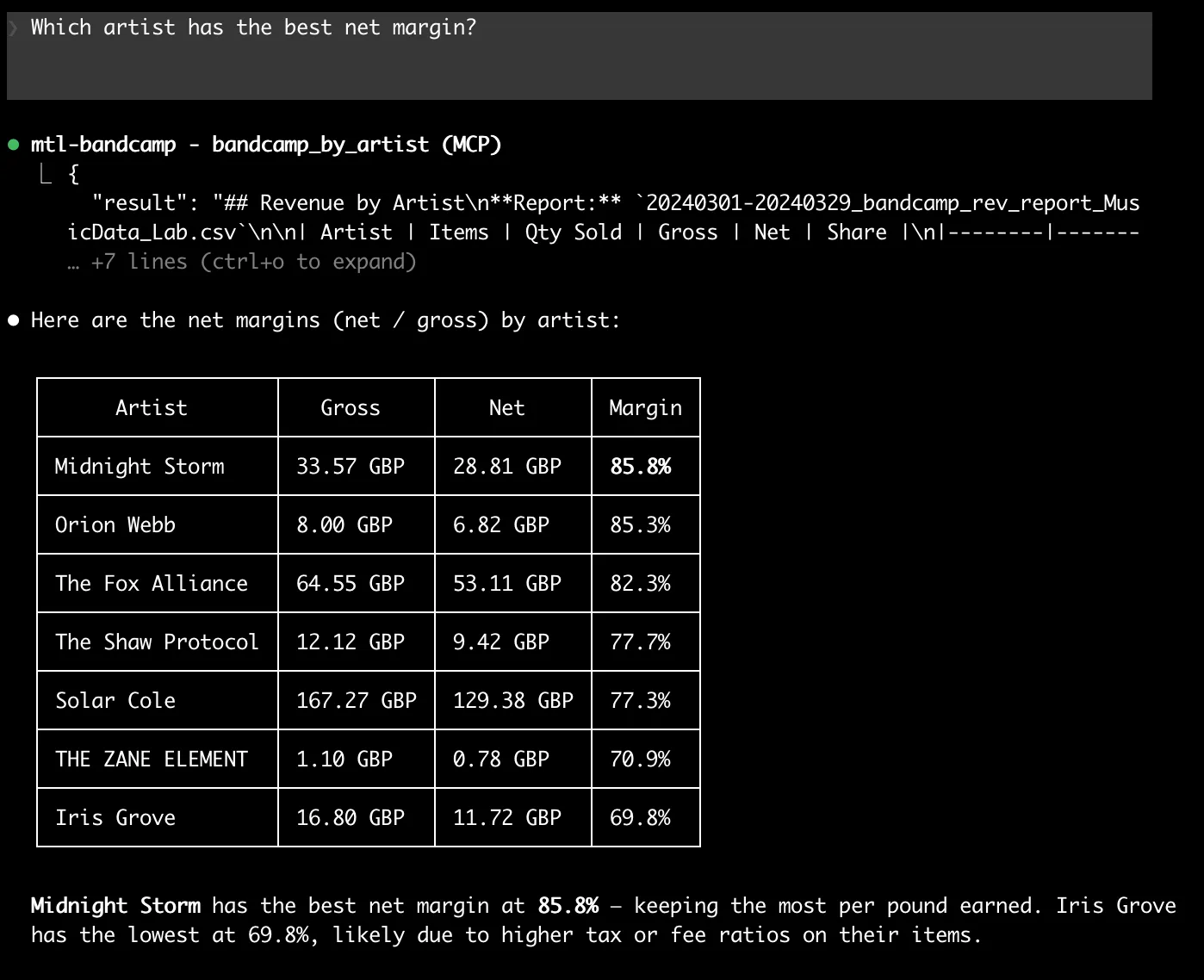
| Midnight Storm | 1 | 4 | 33.57 GBP | 28.81 GBP | 12.0% |
| Iris Grove | 2 | 2 | 16.80 GBP | 11.72 GBP | 4.9% |
Finding top sellers
> What are the top 5 items by quantity sold?
| # | Item | Artist | Type | Qty | Gross | Net |
|---|---|---|---|---|---|---|
| 1 | The Little Fantasies | Solar Cole | album | 9 | 83.87 GBP | 64.31 GBP |
| 2 | Short Dreams | The Fox Alliance | album | 6 | 64.55 GBP | 53.11 GBP |
| 3 | The Open Offerings | Solar Cole | album | 6 | 55.02 GBP | 44.01 GBP |
| 4 | The Broad Chorus | Midnight Storm | album | 4 | 33.57 GBP | 28.81 GBP |
| 5 | Premier Visions | Solar Cole | album | 3 | 28.38 GBP | 21.06 GBP |
You can sort by net, gross, or quantity and set any limit.
Looking up a specific item
> Show me all the details for catalog number MDL-2939
Claude returns every field for that item: UPC, ISRC, region, item type, and a full fee breakdown.
More prompt ideas
Here are some real-world prompts you can try. Click each one to see the result:
List all available Bandcamp reports
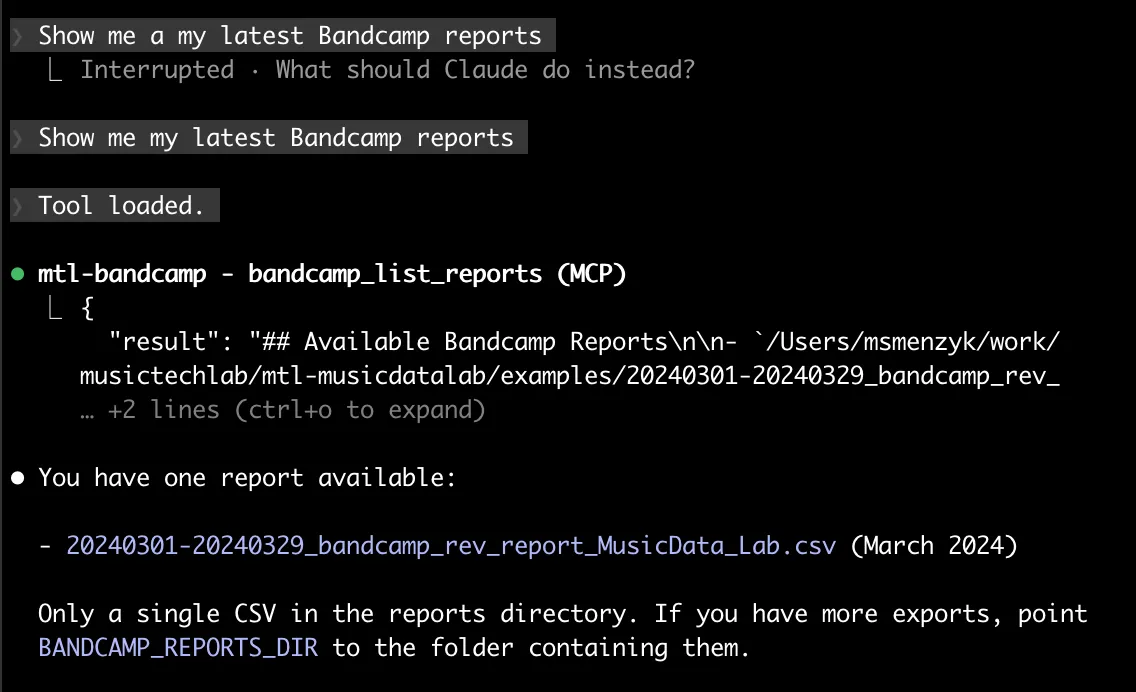
What are the top 5 items by quantity sold?
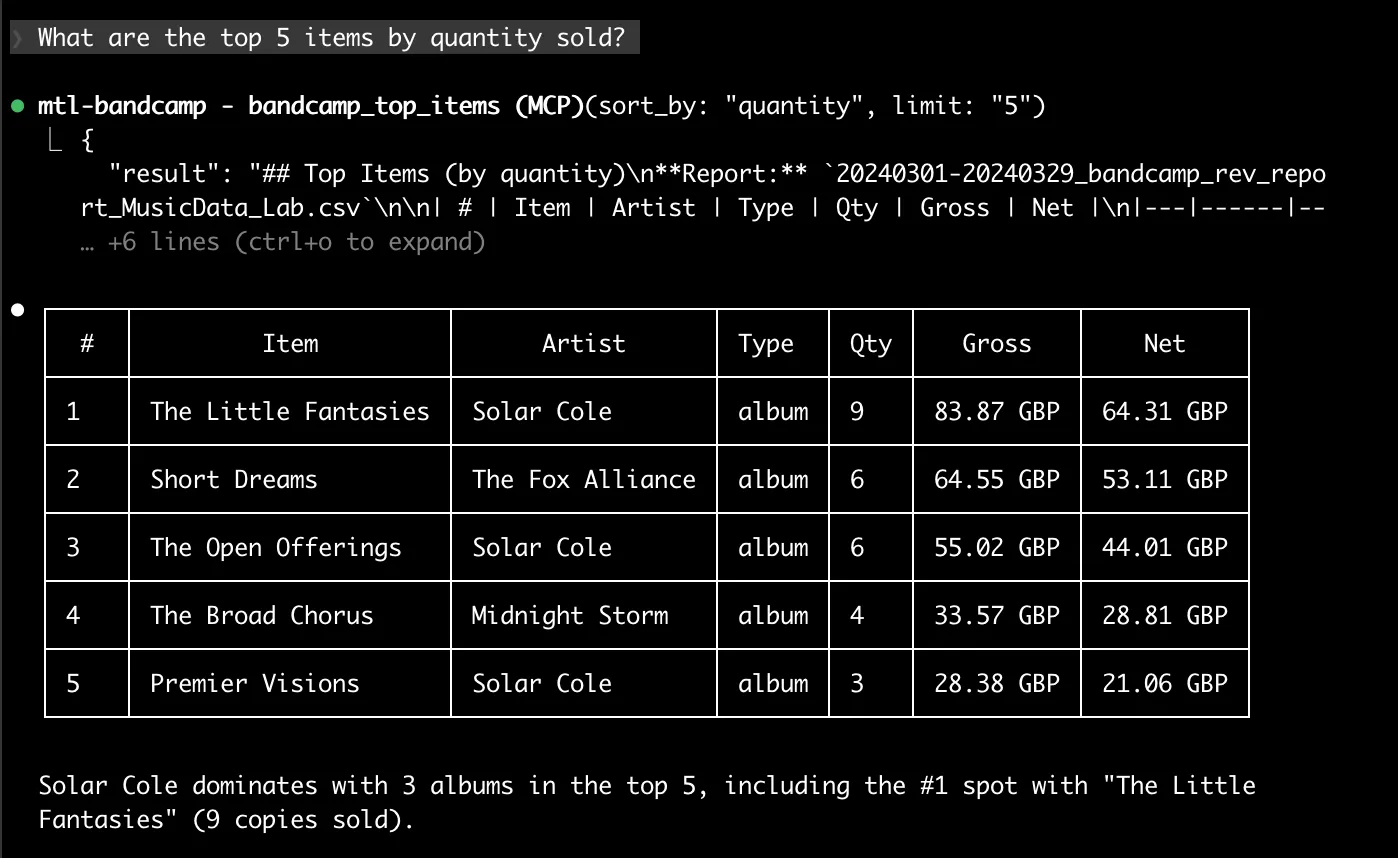
How much did we pay in Bandcamp fees this quarter?
Which artist has the best net margin?
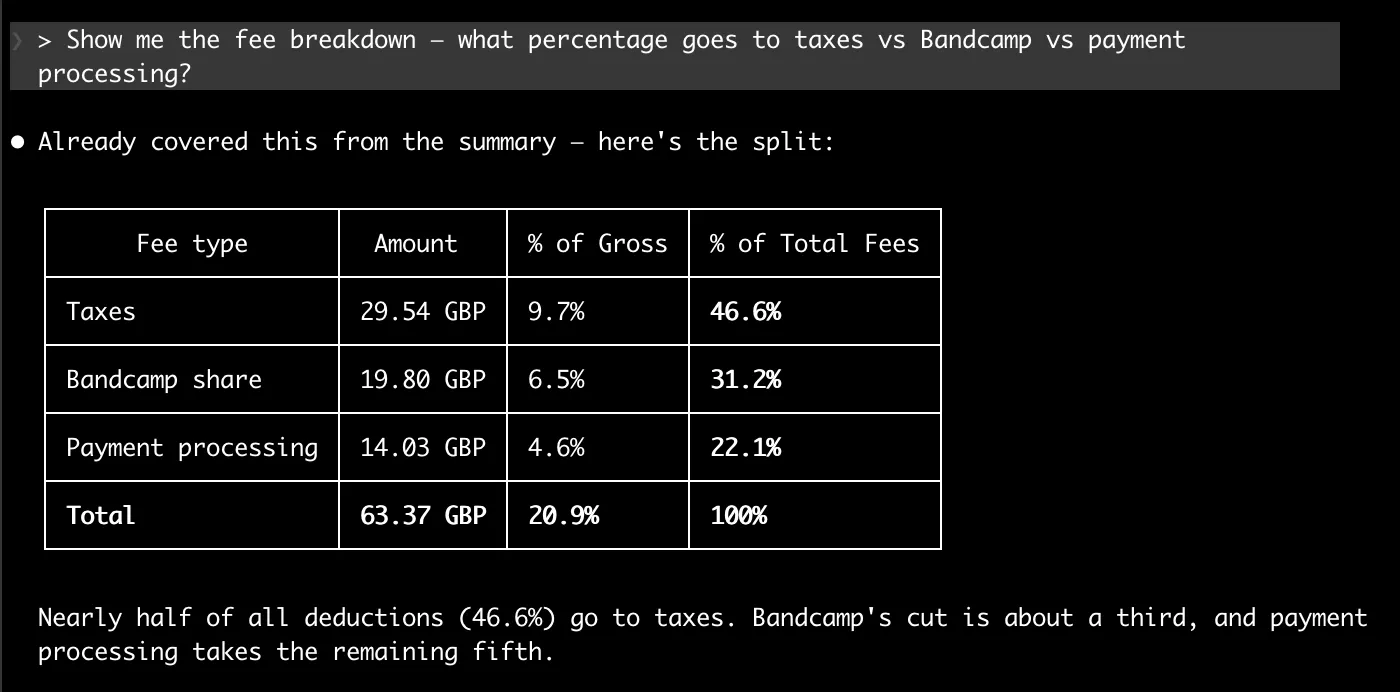
Show me the fee breakdown — what percentage goes to taxes vs Bandcamp vs payment processing?
You can chain prompts naturally. Ask Claude for a summary first, then drill into a specific artist or item. The conversation context carries over, so Claude remembers the report it just loaded.
Visualizing the data
You can also generate charts from the report data. Just ask:
> Show me which artists earned the most as a chart
---
config:
    xyChart:
        width: 800
        height: 500
---
xychart-beta
    title "Net Revenue by Artist (GBP)"
    x-axis ["Solar Cole", "Fox Alliance", "Midnight Storm", "Iris Grove", "Shaw Protocol", "Orion Webb", "Zane Element"]
    y-axis "Net Revenue (GBP)" 0 --> 140
    bar [129.38, 53.11, 28.81, 11.72, 9.42, 6.82, 0.78]
> Show me the revenue share breakdown as a pie chart
---
config:
    pie:
        useWidth: 700
---
pie title Revenue Share by Artist
    "Solar Cole" : 53.9
    "The Fox Alliance" : 22.1
    "Midnight Storm" : 12.0
    "Iris Grove" : 4.9
    "The Shaw Protocol" : 3.9
    "Orion Webb" : 2.8
    "The Zane Element" : 0.3
> What percentage of fees goes to taxes vs Bandcamp vs payment processing?
---
config:
    pie:
        useWidth: 700
---
pie title Fee Breakdown (% of Total Fees)
    "Taxes" : 46.6
    "Bandcamp Share" : 31.2
    "Payment Processing" : 22.1
All charts are rendered inline, with the site's dark theme and brand styling. No spreadsheet, no BI tool, no context switching.
Handling Bandcamp's CSV Format
Bandcamp exports revenue reports in UTF-16 encoding by default, which trips up most CSV parsers. mtl-bandcamp-mcp handles this transparently - it tries UTF-16 first, then falls back to UTF-8-sig and UTF-8. You never have to think about encoding issues.
Tech Stack
With Poetry for dependency management.
Standard library CSV parsing with smart encoding detection.
Model Context Protocol server framework.
The entire codebase is a single server module with clean, focused logic.
Getting Started
Installation
git clone https://github.com/musictechlab/mtl-bandcamp-mcp.git
cd mtl-bandcamp-mcp
poetry install
Register with Claude Code
claude mcp add -s user mtl-bandcamp -- bash -c "cd /path/to/mtl-bandcamp-mcp && poetry run python -m mtl_bandcamp_mcp"
Configuration
Set BANDCAMP_REPORTS_DIR to point to the directory containing your Bandcamp CSV exports:
export BANDCAMP_REPORTS_DIR=~/Documents/bandcamp-reports
Restart Claude Code, and all five tools are available immediately.
You can verify the server is connected by running claude mcp list - look for mtl-bandcamp in the output.
What is Next
This is version 0.1.0. Here is what I am considering for future releases:
Compare two reports side by side to spot revenue trends and growth.
Revenue grouped by buyer region to understand geographic demand.
Track revenue over multiple reporting periods with growth indicators.
Push dashboard data directly to Google Sheets for sharing with stakeholders.
Have an idea for a feature I have not thought of? I would love to hear it. drop me a line and shape the roadmap together.
Open Source
mtl-bandcamp-mcp is MIT licensed and available on GitHub:
github.com/musictechlab/mtl-bandcamp-mcp
This project is experimental and in early development. Revenue data is read-only - the server never modifies your CSV files.
Contributions, issues, and feature requests are welcome. If you run a label on Bandcamp and want to streamline your revenue reporting, give it a try and let me know what you think.
FAQ
What is mtl-bandcamp-mcp?
It is an open source MCP (Model Context Protocol) server that lets Claude Code parse Bandcamp revenue CSV exports and present interactive dashboards with summaries, artist breakdowns, and top-selling items.
What file formats are supported?
Bandcamp CSV exports in both UTF-16 (Bandcamp default) and UTF-8 encodings.
How do I install mtl-bandcamp-mcp?
Clone the repo, run poetry install, and register it with Claude Code using the claude mcp add command.
What data can I see in the dashboard?
Gross and net revenue, fee breakdowns (taxes, Bandcamp share, collection society, payment processing, shipping), revenue by artist with share percentages, top-selling items, and detailed catalog item views.
Mirroring a Wearable OLED Display to a Projector for Live Demos
How to stream a tiny OLED screen from an embedded device to a laptop and projector in real-time using UART and Python. A practical guide for hardware demos and presentations.
mtl-metadata-mcp: Open Source Audio Metadata Embedding for Claude Code
I built an open source MCP server that reads and writes metadata tags in MP3, FLAC, and OGG files directly from Claude Code. Here is how it works.