mtl-metadata-mcp: Open Source Audio Metadata Embedding for Claude Code
I built an open source MCP server that reads and writes metadata tags in MP3, FLAC, and OGG files directly from Claude Code. Here is how it works.
Key takeaways
- Read, write, scan, and clear audio metadata in MP3, FLAC, and OGG from natural language.
- Directory scanning flags files with missing ISRC codes, genres, or other required tags.
- The entire codebase is under 200 lines of core logic with 14 automated tests.
- MIT licensed and open source; installs with Poetry and registers with Claude Code.
Every music file carries invisible data: the artist name, album, genre, release year, and the ISRC code that ties a recording to its rights holder. When this metadata is missing or incorrect, royalties get lost, catalog searches fail, and distributors reject deliveries. I built mtl-metadata-mcp to solve this problem directly from the command line, using natural language.
What is MCP? The Model Context Protocol (MCP) is an open standard that lets AI assistants like Claude connect to external tools. Instead of copying and pasting data between apps, you describe what you want in plain English and the AI calls the right tool automatically. MCP servers are lightweight programs that expose specific capabilities - reading files, querying APIs, or in my case, manipulating audio metadata.
Why I Built This
I sometimes need to quickly verify or fix metadata in audio files - checking ISRC codes, correcting artist names, or spotting missing tags before a delivery. It is not my daily job, but when it comes up, I wanted a tool that lets me do it fast without leaving the terminal:
Read metadata from any audio file and present it clearly.
Write metadata using natural language commands.
Scan entire directories to find files with missing or incomplete tags.
Work inside my development workflow without switching contexts.
Since I already use Claude Code for development, building an MCP server was the natural choice.
The Tools
mtl-metadata-mcp exposes four tools:
Read current metadata tags and file info (format, duration, bitrate, sample rate, channels) from an audio file.
Embed or update title, artist, album, date, genre, and ISRC. Only the fields you specify are changed.
Strip all metadata tags from a file. Audio data is preserved.
Scan a directory for audio files and report which metadata fields are present or missing.
Supported Fields
| Field | Description | Example |
|---|---|---|
| Title | Track name | "Back in Black" |
| Artist | Performer | "AC/DC" |
| Album | Album name | "Back in Black" |
| Date | Release year | "1980" |
| Genre | Music genre | "Classic Rock" |
| ISRC | International Standard Recording Code | "AUAP07900028" |
How It Works in Practice
Once installed, you just talk to Claude Code. No commands to memorize, no flags to look up.
Reading metadata
Ask Claude to read a file:
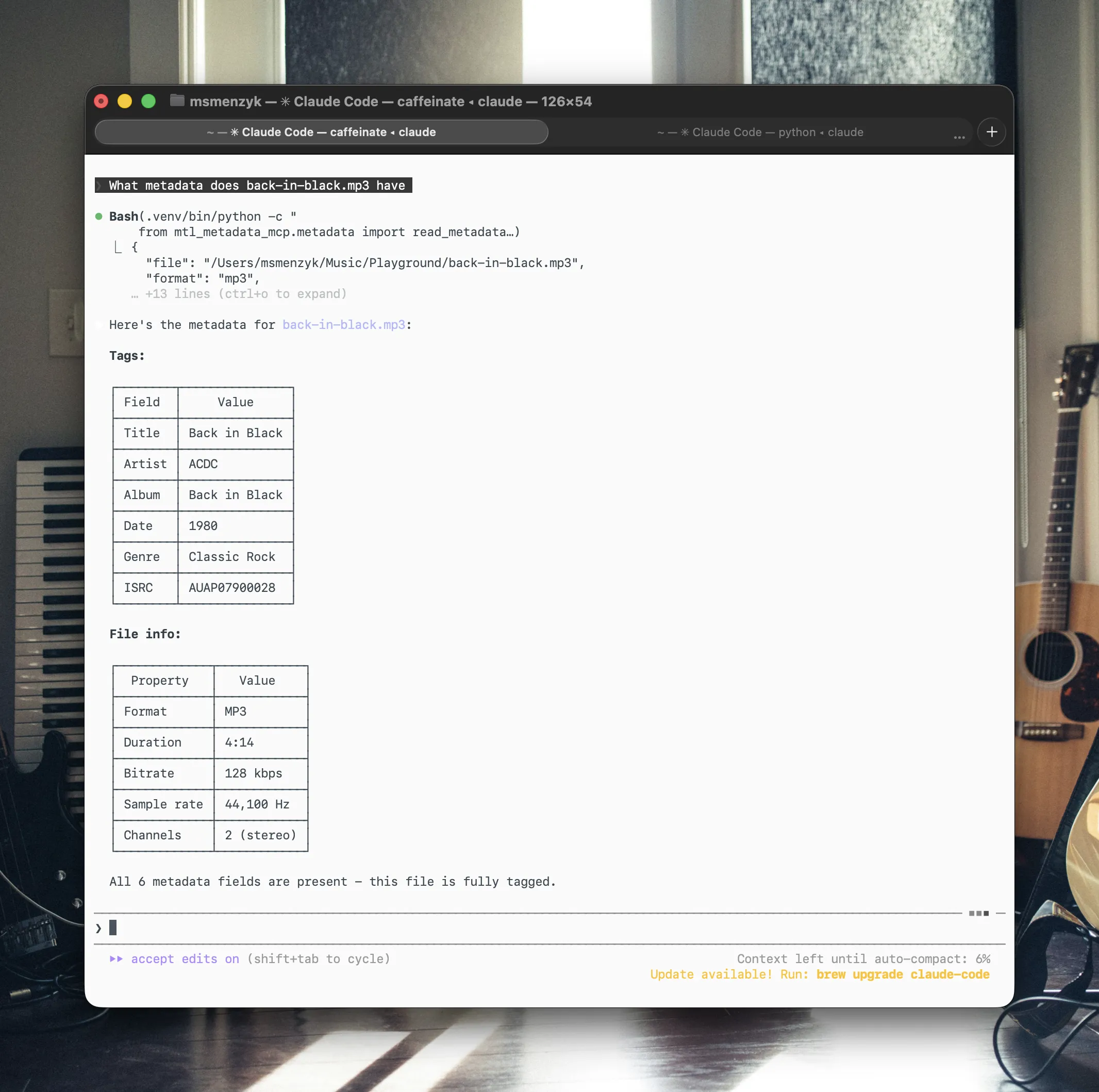
> What metadata does back-in-black.mp3 have?
The response comes back as structured data:
{
  "file": "/Users/you/Music/back-in-black.mp3",
  "format": "mp3",
  "duration_seconds": 254.38,
  "bitrate_kbps": 128,
  "sample_rate_hz": 44100,
  "channels": 2,
  "metadata": {
    "title": "Back in Black",
    "artist": "ACDC",
    "genre": "Classic Rock"
  }
}
Claude then formats this into a readable table and points out missing fields - in this case, album, date, and ISRC.
Writing metadata
Tell Claude what to fill in:
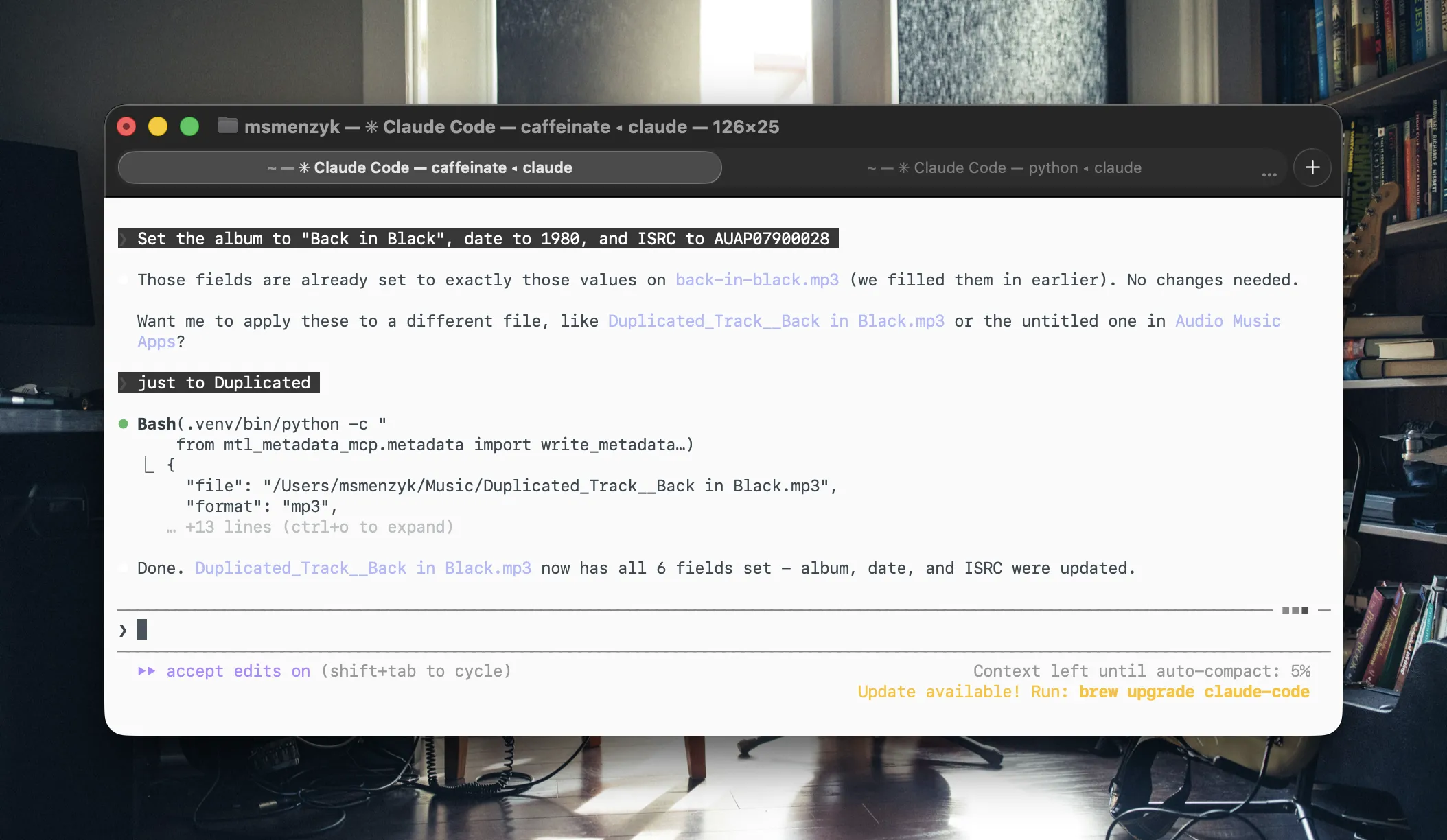
> Set the album to "Back in Black", date to 1980, and ISRC to AUAP07900028
Only the specified fields are updated. Everything else stays untouched.
Scanning a library
This is where it gets powerful:
> Scan ~/Music/demos and tell me which tracks are missing ISRC codes
{
  "directory": "/Users/you/Music/demos",
  "total_files": 3,
  "files": [
    {
      "file": "idea-01.mp3",
      "has_metadata": true,
      "fields_present": ["title", "artist"],
      "fields_missing": ["album", "date", "genre", "isrc"]
    },
    {
      "file": "sketch.flac",
      "has_metadata": false,
      "fields_present": [],
      "fields_missing": ["title", "artist", "album", "date", "genre", "isrc"]
    }
  ]
}
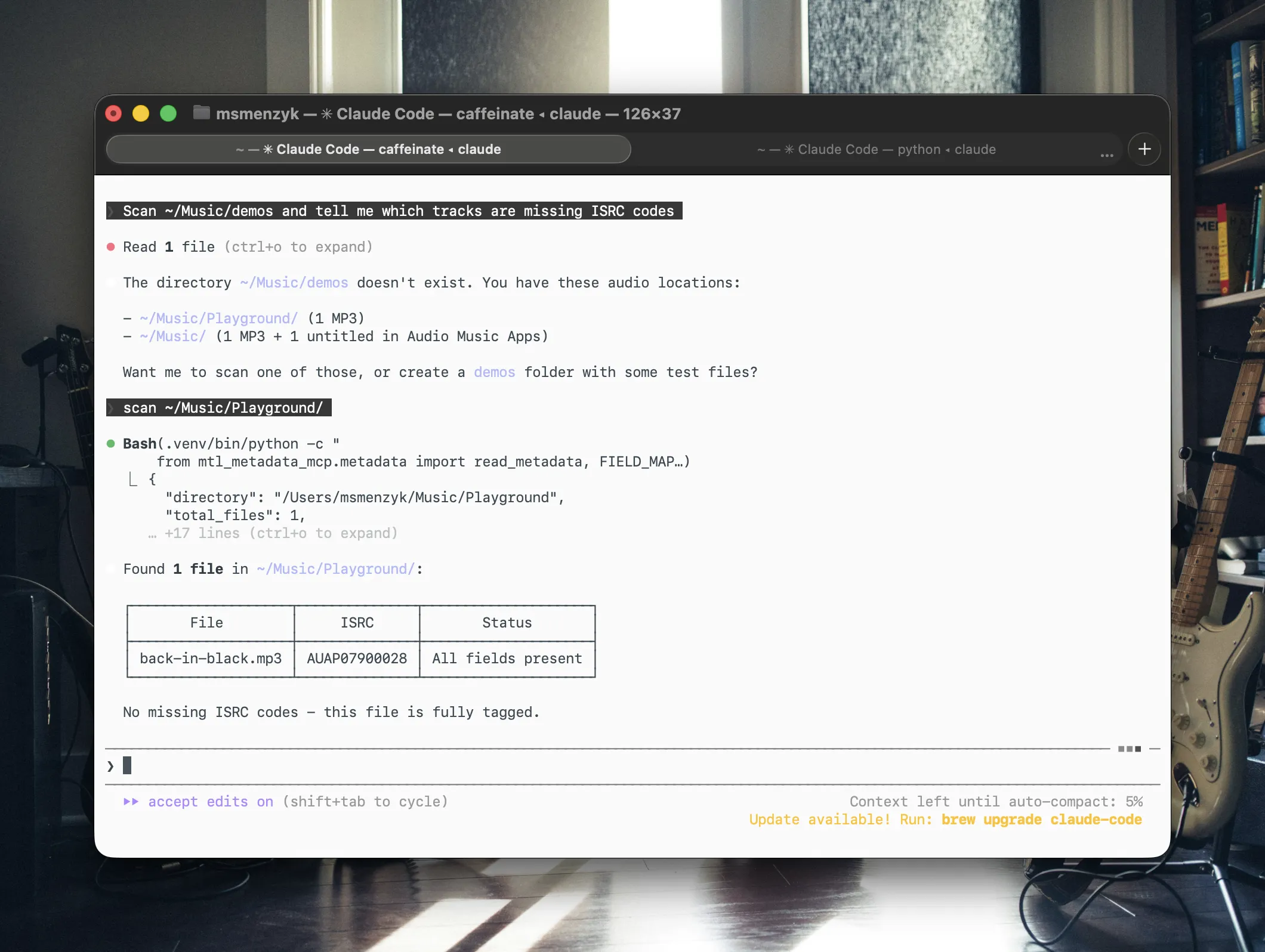
You can then follow up with batch commands:
> Set ISRC codes USAB12300001 through USAB12300003 on each track in order
More prompt ideas
Here are some real-world prompts you can try:
> Read the metadata from all files in ~/Music/masters and show me a summary table
> Change the artist on demo-v3.mp3 from "Unknown" to "Jane Doe"
> Which files in ~/Music/releases have no genre tag?
> Copy the metadata from track-01.mp3 and apply it to track-01-remastered.mp3
> Strip all metadata from every file in ~/Music/stems
> Check if any FLAC files in ~/Music/archive are missing ISRC codes, then list them
> Set genre to "Electronic" on all MP3 files in ~/Music/ep that currently have no genre
You can chain prompts naturally. Ask Claude to scan first, review the results, then tell it what to fix. The conversation context carries over, so Claude remembers which files it just scanned.
Tech Stack
With Poetry for dependency management.
Cross-format audio tag handling (ID3v2, Vorbis comments).
Model Context Protocol server framework.
The entire codebase is under 200 lines of core logic, plus 14 automated tests.
Getting Started
Installation
git clone https://github.com/musictechlab/mtl-metadata-mcp.git
cd mtl-metadata-mcp
poetry install
Register with Claude Code
claude mcp add -s user mtl-metadata -- bash -c "cd /path/to/mtl-metadata-mcp && poetry run python -m mtl_metadata_mcp"
Restart Claude Code, and the four metadata tools are available immediately.
You can verify the server is connected by running claude mcp list - look for mtl-metadata in the output.
What is Next
This is version 0.1.0. Here is what I am considering for future releases:
Broadcast Wave Format (BWF) metadata for production and mastering workflows.
Embed and extract album artwork directly from audio files.
A dedicated tool for applying metadata changes across entire folders in one go.
Map metadata fields to DDEX ERN standards for catalog delivery workflows.
Have an idea for a feature I have not thought of? I would love to hear it. drop me a line and shape the roadmap together.
Open Source
mtl-metadata-mcp is MIT licensed and available on GitHub:
github.com/musictechlab/mtl-metadata-mcp
This project is experimental and in early development. Always back up your audio files before modifying metadata.
Contributions, issues, and feature requests are welcome. If you work with music catalogs and want to streamline your metadata workflow, give it a try and let me know what you think.
FAQ
What is mtl-metadata-mcp?
It is an open source MCP (Model Context Protocol) server that lets Claude Code read and write metadata tags like title, artist, album, date, genre, and ISRC in audio files.
What audio formats are supported?
MP3 (ID3v2 tags), FLAC (Vorbis comments), and OGG (Vorbis comments).
How do I install mtl-metadata-mcp?
Clone the repo, run poetry install, and register it with Claude Code using the claude mcp add command.
What is an ISRC code?
The International Standard Recording Code (ISRC) is a unique identifier assigned to each sound recording, used globally for tracking royalties and rights.
Querying Bandcamp Revenue Reports with Natural Language — Meet mtl-bandcamp-mcp
An open source MCP server that turns Bandcamp CSV exports into queryable dashboards. Ask about artist splits, fee breakdowns, and top sellers — no spreadsheet needed.
NFC Tag Emulation on nRF52840 with Rust — No SDK Required
How to turn a bare nRF52840 into an NFC Type 2 Tag using only PAC registers and Embassy async, running alongside BLE SoftDevice. A practical walkthrough with full code.