Swimming testimonials and the tempo math behind them
On vimoswim.com the coach quotes swim across a pool. Stop a swimmer and the quote opens. Both the pool and the tempo calculator behind it run live here.
I am tired of testimonial carousels. Five stars, a round photo, a quote in italics, an arrow to the next one. Every landing page has them, and I scroll past every one. I do not doubt the people in them. I just stop seeing them.
Vimo Swim is a metronome for swimmers. Coaches already use it. Their words should not look like the words on a page that sells mattresses.
The pool
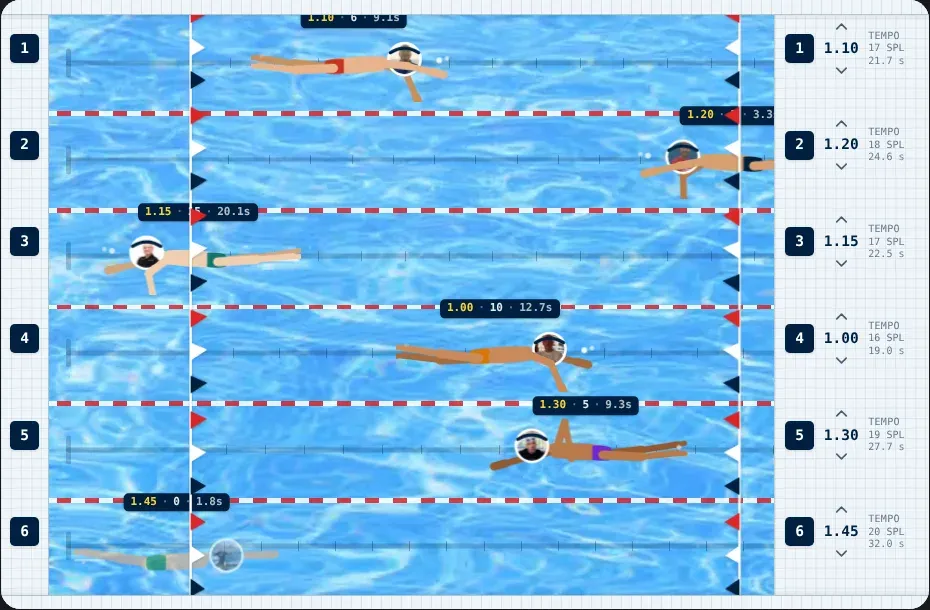
So on the vimoswim.com home page the coaches swim. One lane per coach, the coach's photo as the head. Move the mouse over a swimmer, or tap one, and that swimmer stops and treads water. A bubble with their quote opens next to them. The others keep swimming.
This is the same component, running inside this article:
Finally, a tempo trainer that matches how I teach swimming. The programmable intervals are exactly what my athletes need.
Rafa Aledo, TI Trainer, Spain Not just a beeper, but a real training tool. My clients have been asking for this.
Paweł Lewicki, TI Trainer, Poland The visual display changes everything. My swimmers focus on technique while still tracking tempo.
Witold Musiał, Personal Trainer, TI Cracow I've tried every tempo trainer on the market. Vimo is the first one that feels like it was built by swimmers, for swimmers.
Aleksander Ryszka, Swimming Coach Rhythm is the foundation of efficient swimming. Vimo gives swimmers the precise feedback they need to internalise the right patterns.
Daniel Bobrowski, Swimming Coach When I trained for Gibraltar, consistency was everything. Hours of swimming where every stroke had to be the same.
Piotr Klimczak, Open Water Swimmer, Gibraltar Strait
A playful preview, not a training tool. Each coach keeps their strokes per length as you turn the tempo; in the water a faster tempo usually costs more strokes per length, and holding the count at speed is exactly what you train with Vimo.
Try the small arrows on the right deck. They change a coach's tempo by 0.05 s, like the buttons on the device. The swimmer speeds up or slows down from the spot where they are.
Why a pool
Three reasons.
The product is about swimming, so the social proof swims too. A carousel says "people like this". A pool says "these people are in the water with it". The form does half the work before anyone reads a word.
Motion catches the eye. People notice something that moves. A row of quote cards is still, so the eye slides over it. Six swimmers turning at the wall are hard to ignore.
The reader controls the pause. A carousel that moves on its own takes the quote away while you are still reading. Here nothing leaves until you let it go. You stop the swimmer, you read, you let them swim on.
How it works
The component is one Vue file. No canvas and no game engine. Each swimmer is a button with an SVG figure inside.
The animation loop. One cycle is two lengths. The Web Animations API moves the button from wall to wall and switches between three poses: tucked at the wall, gliding under water after the push-off, and stroking. CSS keyframes move the arms, legs and head at the coach's tempo. The arms spear, catch, pull and recover. The legs do a two-beat kick. There is a breath every third stroke.
The speed. Each lane follows one formula: time for a length = strokes per length × seconds per stroke + 3 s of glide after the push-off. The ticks on the lane line show where each stroke lands. I have to be honest about the numbers, though. The tempo and stroke count for each coach are example values I picked when I built the pool. They are in a reasonable range for good swimmers, but they are not measured. So the formula is real, but these coaches do not really swim at these exact tempos.
The pause. Stopping a swimmer pauses only that swimmer's animations. When they swim on, they continue from the same spot, so nobody jumps.
The bubble. The pool cuts off anything outside its edges, so the bubble sits one level up and is placed from the swimmer's position. It opens below the swimmer in the top two lanes and above in the others, and it never goes past the side of the pool.
Mobile. A finger has no hover. A tap pins the bubble, a second tap releases it, and a tap outside the pool closes it. On vimoswim.com phones get a plain quote carousel. For this article I made the pool work at phone width too: the deck on the right shows only the tempo buttons, and the swimmers are smaller.
Reduced motion. If your system asks for less motion, nobody swims. The coaches rest along their lanes, the flags stop moving, and the water video is replaced by a still image. A tap or a click still opens every quote.
Accessibility. Each swimmer is a real button, so the Tab key reaches it. Keyboard focus stops the swimmer and opens the bubble, and Escape closes it. A screen reader does not need the animation at all: every quote is also in the page as text, and each button points to its quote.
Where does a tempo come from?
Every swimmer in that pool has a stroke rhythm. That rhythm is the whole idea behind Vimo. You set a number, for example 1.20 s, and the device beeps every 1.20 s. You take one stroke per beep.
But how do you pick the number? Most swimmers know two things about their swim: their pace per 100 m and roughly how many strokes they take per length. The tempo follows from those two.
The tempo calculator
Here is the math, in plain words:
- Divide your pace per 100 m by 100 and multiply by the pool length. That is the time for one length.
- Take away the push-off. That is the time you really swim.
- Divide that time by your strokes per length. That is your tempo in seconds per stroke.
- Divide 60 by the tempo to get strokes per minute.
An example. 2:00 per 100 m in a 25 m pool is 30 s per length. Take away a 3 s push-off and you swim for 27 s. With 18 strokes that is 1.50 s per stroke, or 40 strokes per minute.
Tempo calculator
From pace and stroke count to the number you set on a tempo trainer.
Seconds per stroke
1.50
Strokes per minute
40
One length takes 30.0 s. Minus the push-off, you swim for 27.0 s.
Seconds per stroke. Rows are pace per 100 m, columns are strokes per length (25 m pool, 3 s push-off). Tap a cell to load it.
| Pace per 100 m, strokes per length | 14 | 16 | 18 | 20 | 22 |
|---|---|---|---|---|---|
| 1:30 | |||||
| 1:45 | |||||
| 2:00 | |||||
| 2:15 | |||||
| 2:30 |
The grid below the result shows the tempo for a few paces and stroke counts. Tap a cell to load its values. It helps to see one thing: if you take fewer strokes at the same pace, each stroke gets longer and the tempo number goes up.
The 3 s push-off is a default, not a rule. A strong push-off with dolphin kicks can carry you further. Measure your own once and put it in.
This is also why the device has to keep time well. A tester once found Vimo beeping 33% slower than it was set, and I wrote about testing a swim metronome with a Mac microphone. If the beep is wrong, the whole calculation above is useless in the water.
Will it stay?
I honestly do not know if the pool stays on vimoswim.com. It took more work than a carousel, and a pretty animation that nobody uses is just extra weight on the page.
So we will measure two things: how many visitors stop a swimmer to read a quote, and how long they spend on the section. If people play with it, it stays. If they scroll past it like every other carousel, it goes, and I will write that up too.
Swim data is a story we are building anyway. Garmin already sends swims to our backend, and I wrote about the first Garmin swim that reached a details page. One day the tempo in that pool could come from a coach's real swim. Then the numbers above the swimmers would be real too.
Smart Home on a Budget: BLE Window Sensors with Two Pico Ws and MicroPython
How I built a wireless window monitoring system using two Raspberry Pi Pico Ws, reed switches, and BLE — with async MicroPython, aioble, and zero cloud dependencies.
Testing a swim metronome with a Mac microphone
A tester heard Vimo Swim beep 33% slower than set. We fixed the firmware in an afternoon, then built one command that records the beeps with the Mac mic and checks the tempo to 1%.