
Codemagic MCP Server: Trigger Mobile CI Builds from Claude Code
I open-sourced mcp-codemagic, an MCP server that brings Codemagic CI/CD into Claude Code. List apps, trigger builds, check status, and cancel runs without leaving your terminal.
Key takeaways
- mcp-codemagic exposes six tools covering the full Codemagic build lifecycle.
- Natural language replaces REST calls: trigger, watch, and cancel mobile builds from the terminal.
- It wraps the Codemagic REST API with x-auth-token, in about 150 lines of Python.
During development of VimoSwim, every iOS and Android release runs through Codemagic, my CI/CD platform of choice for Flutter. The pipeline itself is solid, but checking on a build still meant leaving the terminal, opening the dashboard, and navigating through the project to find a status that a single API call could have returned.
So I asked the obvious question: what if Claude could orchestrate the build directly, triggering a release, polling its status, and cancelling a misconfigured run from the same environment where I already write the code?
Because no Codemagic MCP server existed, I built one. Today I am open-sourcing mcp-codemagic, a Model Context Protocol server that brings Codemagic CI/CD directly into Claude Code.
What is MCP?
The Model Context Protocol (MCP) is an open standard that lets AI assistants like Claude interact with external tools and services. Think of it as a plugin system: you register an MCP server, and Claude gains new abilities.
In my case, those abilities are CI/CD builds.
What the server does
mcp-codemagic exposes six tools that cover the full Codemagic build lifecycle:
| Tool | What it does |
|---|---|
codemagic_list_apps | List every connected app and its workflow ids |
codemagic_get_app | Get one app's repository, branches, and workflows |
codemagic_start_build | Trigger a build for an app and workflow on a branch or tag |
codemagic_get_build | Get the status and details of a build |
codemagic_list_builds | List builds, filtered by app, workflow, branch, or status |
codemagic_cancel_build | Cancel a running or queued build |
That is the entire surface area: discover, trigger, watch, and cancel, which is precisely enough to drive a mobile release without ever touching the dashboard.
How it looks in practice
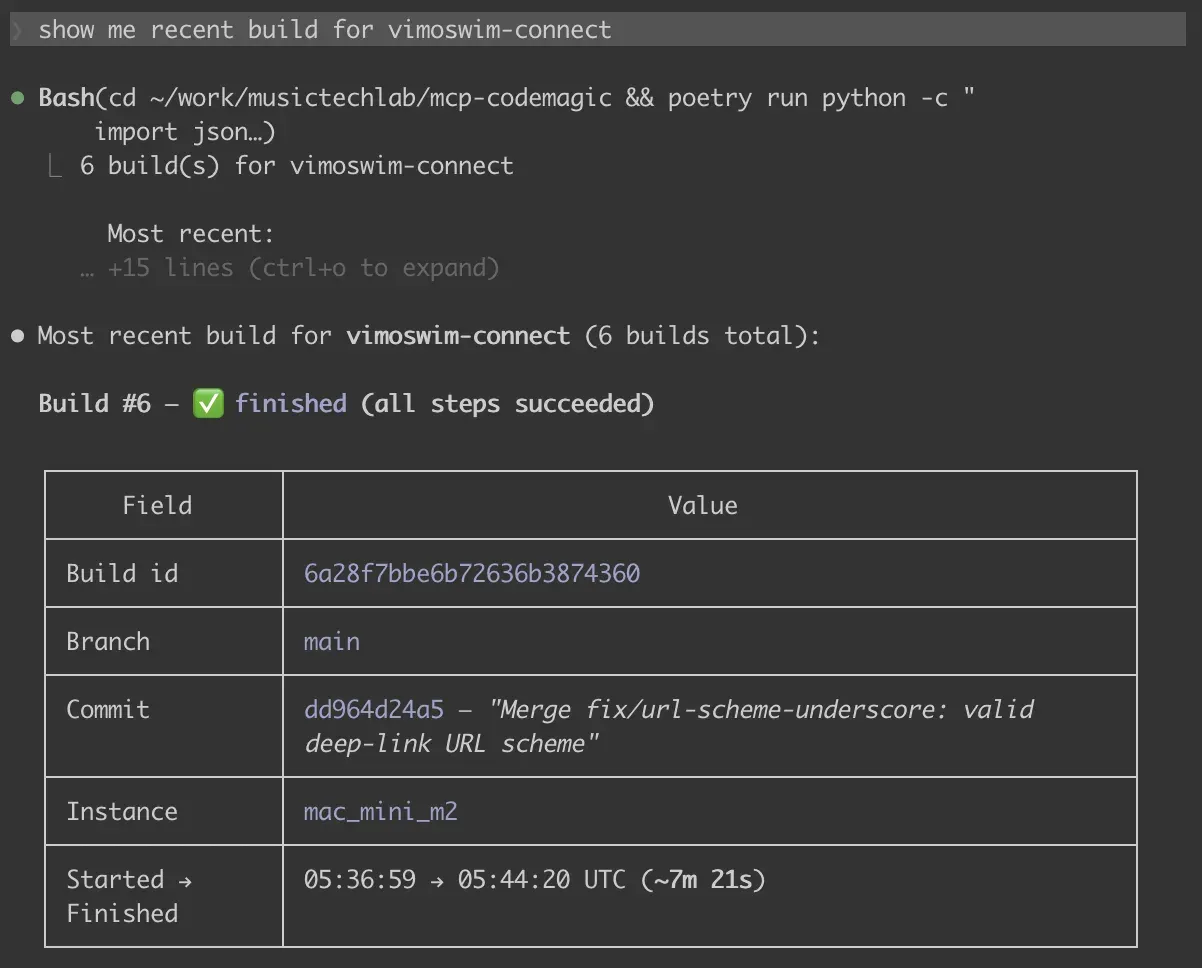
You talk to it in plain language. Ask for the latest build of an app and you get a clean, readable summary instead of raw JSON:
A few prompts I actually use:
- "List my Codemagic apps and their workflows."
- "Start the
ios-releaseworkflow for vimoswim-coach onmain." - "What's the status of build
6a28f92c...?" - "Cancel that build, it's pointing at the wrong branch."
How it wraps the API
The whole thing is a thin wrapper around the Codemagic REST API. Authentication is a single token sent in the x-auth-token header, read from an environment variable so it never lands in code or git history.
DEFAULT_BASE_URL = "https://api.codemagic.io"
TOKEN_ENV = "CODEMAGIC_API_KEY"


def _headers() -> dict[str, str]:
    return {
        "x-auth-token": _token(),
        "Accept": "application/json",
        "Content-Type": "application/json",
    }
Triggering a build is a POST /builds with the app id, the workflow id, and a branch or tag. I validate that you pass exactly one of branch or tag before the request ever leaves your machine:
def start_build(app_id, workflow_id, *, branch=None, tag=None):
    if bool(branch) == bool(tag):
        raise CodemagicError("Provide exactly one of 'branch' or 'tag'.")
    payload = {"appId": app_id, "workflowId": workflow_id}
    if branch:
        payload["branch"] = branch
    if tag:
        payload["tag"] = tag
    return _request("POST", "/builds", json=payload)
Errors come back as JSON instead of raising, so Claude can read a failed status code and explain it to you rather than crashing the tool call.
The token lives under Codemagic, in User settings or Team settings, then Integrations, then Codemagic API. Keep it in a local .env file. It controls real builds, so treat it like a password.
Setting it up
It is a small Python project managed with Poetry.
git clone https://github.com/musictechlab/mcp-codemagic.git
cd mcp-codemagic
poetry install
cp .env.example .env   # then add your CODEMAGIC_API_KEY
Register it with Claude Code in one command:
claude mcp add codemagic -- poetry --directory /path/to/mcp-codemagic run python -m mcp_codemagic
That is it. Claude now has six new tools and can talk to your Codemagic account.
Testing the dangerous part
Two of the tools mutate real infrastructure: start_build and cancel_build. Unit tests with mocked HTTP cover the request construction, but they cannot confirm that the write path actually behaves against the live API, and I was not willing to burn CI minutes on a full release just to find out.
The solution was a trigger-and-cancel test: start a genuine build on a branch, confirm it registers as queued, then immediately cancel it. The build transitioned from queued to canceled within roughly three seconds, before the build machine had even been provisioned, which verified both write tools at a near-zero cost.
I deliberately kept the read tools and the write tools separate in my validation. Read tools (list_apps, get_app, get_build, list_builds) are safe to run anywhere. Write tools touch real builds, so I gate them behind explicit intent.
Why I built this
The honest answer is that it eliminates friction from an operation I perform constantly. When a release is compiling, the recurring question of "is it done yet?" should not demand a context switch into a browser tab and several clicks through a dashboard.
It also continues a pattern I keep returning to: wrapping the services I already pay for in MCP, so that the assistant I already use can operate them directly. I applied the same approach to SignNow e-signatures and to the Verified Human Cert registry. Codemagic is the identical idea, redirected at my mobile release pipeline.
This server can trigger and cancel real builds. Be careful which tools you expose in shared or automated environments, and review who has access to the API token.
Try it
mcp-codemagic is open source under the MIT license and ready to use today.
Clone the repo, install with Poetry, and register it with Claude Code in minutes.
If you run Flutter apps on Codemagic and you live in your terminal, give it a spin. Issues and pull requests are welcome.
FAQ
What is the Codemagic MCP server?
It is an open-source Model Context Protocol server that connects the Codemagic CI/CD REST API to Claude Code and other MCP-compatible clients. It lets you list apps, trigger builds, check build status, and cancel runs directly from your terminal.
Is this an official Codemagic product?
No. This is a side project of mine. It is not affiliated with or endorsed by Codemagic or Nevercode.
What tools does the server provide?
Six tools: codemagic_list_apps, codemagic_get_app, codemagic_start_build, codemagic_get_build, codemagic_list_builds, and codemagic_cancel_build.
Can I use this with clients other than Claude Code?
Yes. Any MCP-compatible client can use this server. Claude Code is the primary client I built it for, but the MCP protocol is open and supported by a growing number of tools.
Cover: Photo by Fotis Fotopoulos on Unsplash
Learning Embedded Rust: A C/Python Developer's Rosetta Stone
A practical guide for C and Python developers transitioning to embedded Rust. Side-by-side comparisons of ownership, error handling, pattern matching, and more — mapped to concepts you already know.
Verified Human Cert MCP Server: Prove Your Music Is Human-Made, Right from the Terminal
I open-sourced an MCP server that queries the Verified Human Cert registry. Verify human-made music certifications by ISRC, artist, track, or cert number directly from Claude Code.