Connecting Your Max for Live Device to a Cloud API
Send song structure data from Ableton Live to a cloud API. Build a complete DAW-to-database pipeline with real-time visualization.
Key takeaways
- A cloud API turns local Ableton exports into a searchable, versioned database.
- FastAPI on Cloud Run receives, validates, and stores JSON from Max for Live.
- Every export gets a browser-based timeline visualization accessible from anywhere.
- The pipeline: Max for Live extracts metadata, sends to API, stores in PostgreSQL.
Introduction
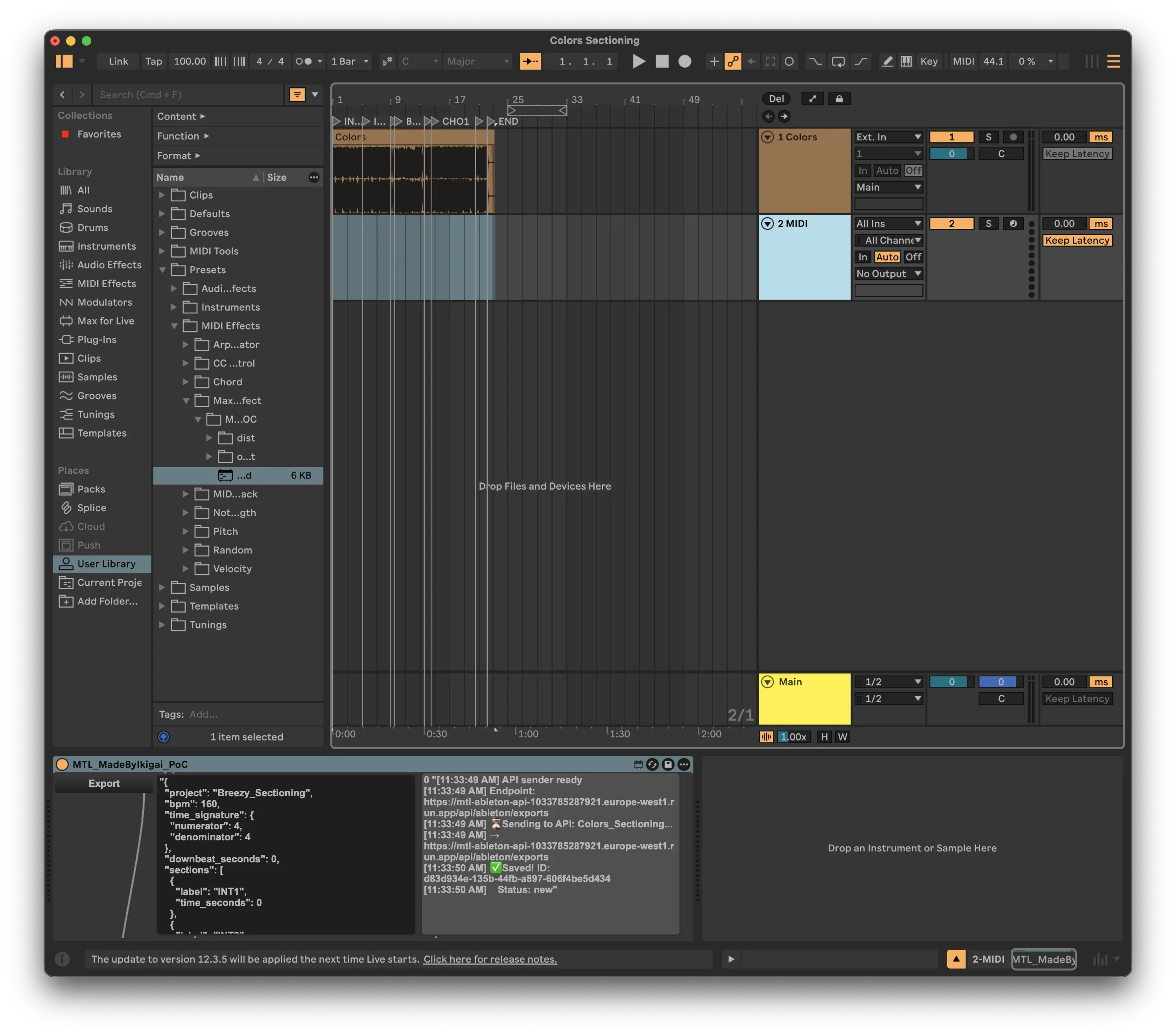
In my previous article, I built a Max for Live device that exports arrangement locators to JSON. The data stayed local - displayed in the device UI or saved to a file.
Now let's take it further: sending that data to a cloud API where it can be stored, visualized, and integrated with other tools.
Why Connect to an API?
Local JSON files are useful, but they have limitations:
| Local Files | Cloud API |
|---|---|
| Manual file management | Automatic storage |
| Single machine access | Access from anywhere |
| No version history | Full export history |
| No visualization | Browser-based timeline view |
| Manual sharing | Team collaboration |
By connecting your Max for Live device to an API, every export becomes part of a searchable, visualized database.
Architecture Overview (C4 Model)
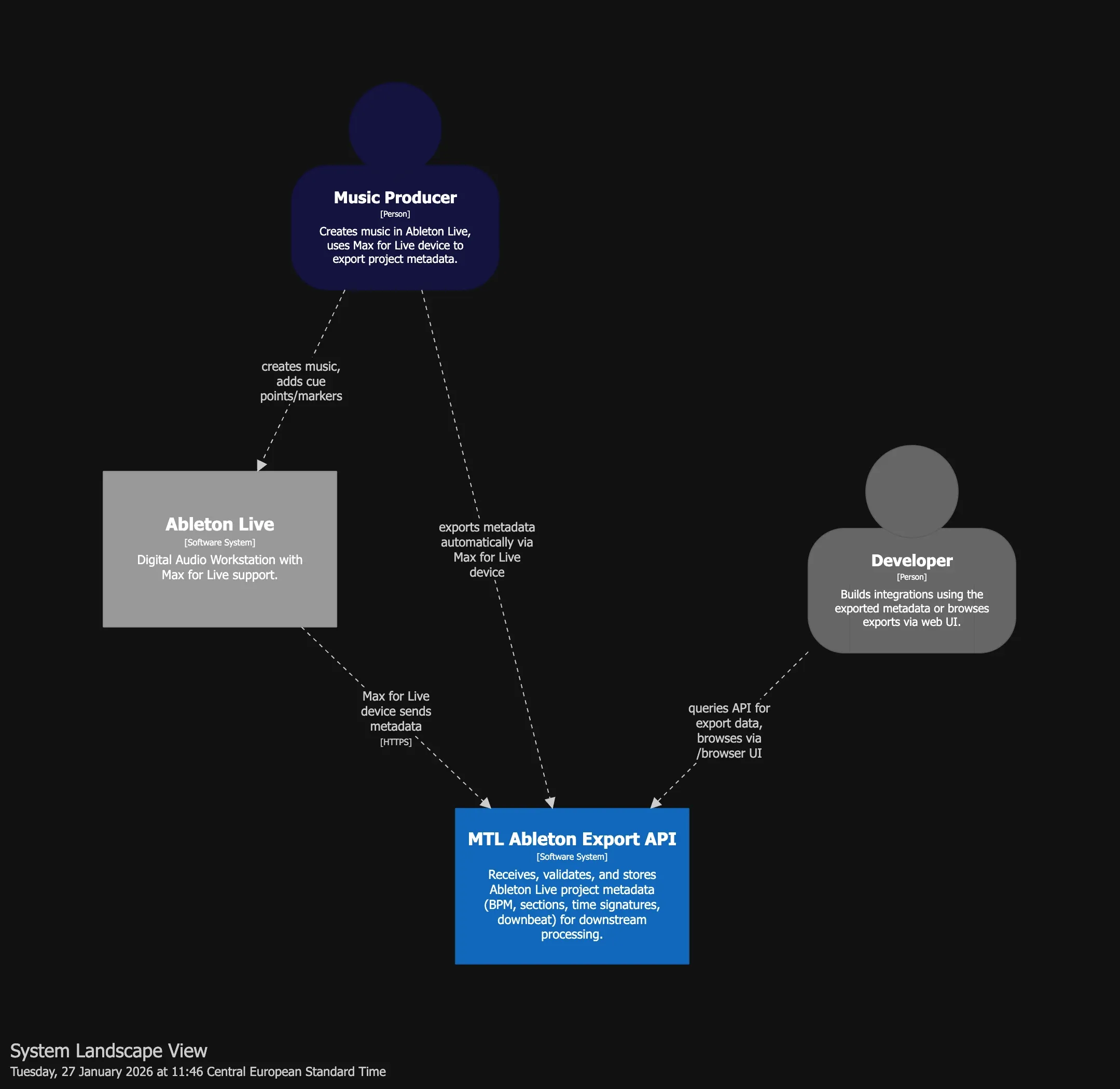
I use the C4 model to document the system architecture. Here's the System Landscape showing all actors and systems:
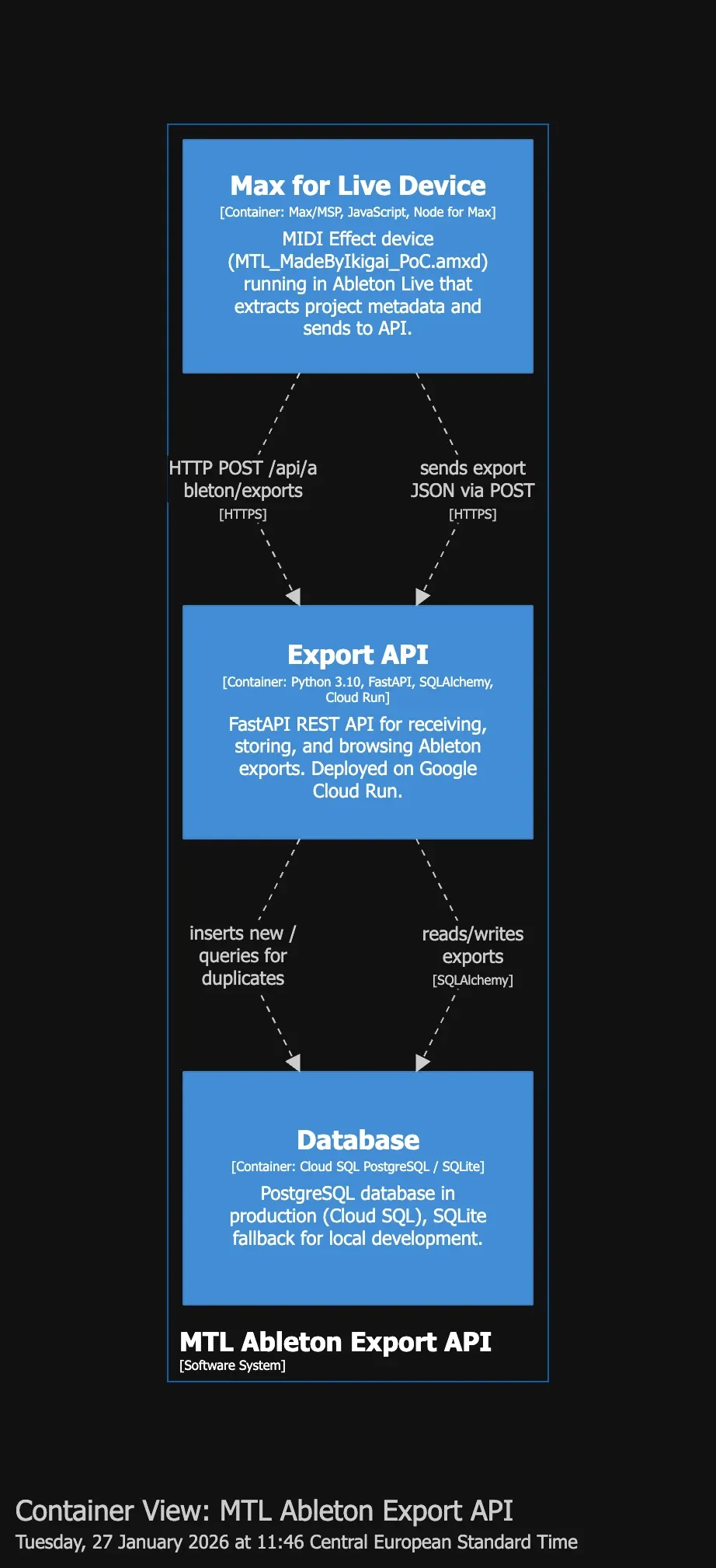
And the Container View showing internal components:
Key Components
| Container | Technology | Responsibility |
|---|---|---|
| Max for Live Device | JavaScript, Node for Max | Extracts metadata from Ableton, sends to API |
| Export API | FastAPI, Cloud Run | Receives, validates, stores exports |
| Database | PostgreSQL (Cloud SQL) | Persistent storage with JSON sections |
The API: Receiving Ableton Exports
My API is built with FastAPI and deployed on Google Cloud Run. Here's the core endpoint:
POST /api/ableton/exports
Receives and stores project metadata from Ableton Live.
Request Schema:
{
  "project": "my_track",
  "bpm": 103.34,
  "time_signature": {
    "numerator": 4,
    "denominator": 4
  },
  "downbeat_seconds": 0,
  "sections": [
    { "label": "INTRO", "time_seconds": 0 },
    { "label": "VERSE", "time_seconds": 16 },
    { "label": "CHORUS", "time_seconds": 48 }
  ],
  "exported_at": "2026-01-27T14:30:00Z",
  "file_path": "/Users/producer/Music/my_track.als"
}
Response:
{
  "id": "550e8400-e29b-41d4-a716-446655440000",
  "project_name": "my_track",
  "bpm": 103.34,
  "time_signature": { "numerator": 4, "denominator": 4 },
  "downbeat_seconds": 0,
  "sections": [...],
  "exported_at": "2026-01-27T14:30:00Z",
  "created_at": "2026-01-27T14:30:05Z",
  "is_duplicate": false
}
Idempotency
The API is idempotent - if you accidentally export the same project twice with the same timestamp, it returns the existing record with is_duplicate: true instead of creating a duplicate.
Extending the Max for Live Device
Now let's modify the JavaScript to send data to the API.
The Challenge: Max for Live HTTP Requests
Max for Live's JavaScript environment doesn't have native fetch() or XMLHttpRequest. Instead, you use the jweb or maxurl objects, or - the simplest approach - shell out to curl.
Core Logic (marker_export.js)
The JavaScript extends my previous export script with API communication:
// Pseudo-code: marker_export.js

function bang() {
  // 1. Get project data from Live via LiveAPI
  song = new LiveAPI("live_set")

  name = song.get("name")           // Project name
  bpm = song.get("tempo")           // BPM
  sigNum = song.get("signature_numerator")
  sigDen = song.get("signature_denominator")

  // 2. Collect all locators (cue points)
  locatorIds = song.get("cue_points")
  sections = []

  for each locatorId:
    locator = new LiveAPI("id " + locatorId)
    sections.push({
      label: locator.get("name"),      // "INTRO", "VERSE", etc.
      time_seconds: locator.get("time") // Position in seconds
    })

  // 3. Build payload matching API schema
  payload = {
    project: name,
    bpm: bpm,
    time_signature: { numerator: sigNum, denominator: sigDen },
    sections: sections,
    exported_at: now()
  }

  // 4. Display in UI + send to API
  outlet(0, JSON.stringify(payload))  // → textedit (preview)
  outlet(1, payload)                   // → node.script (API sender)
}
Key insight: LiveAPI returns arrays for most properties, so always handle Array.isArray() checks.
Alternative: Using node.script
For a more robust solution, use the node.script object which runs a Node.js script directly within Max:
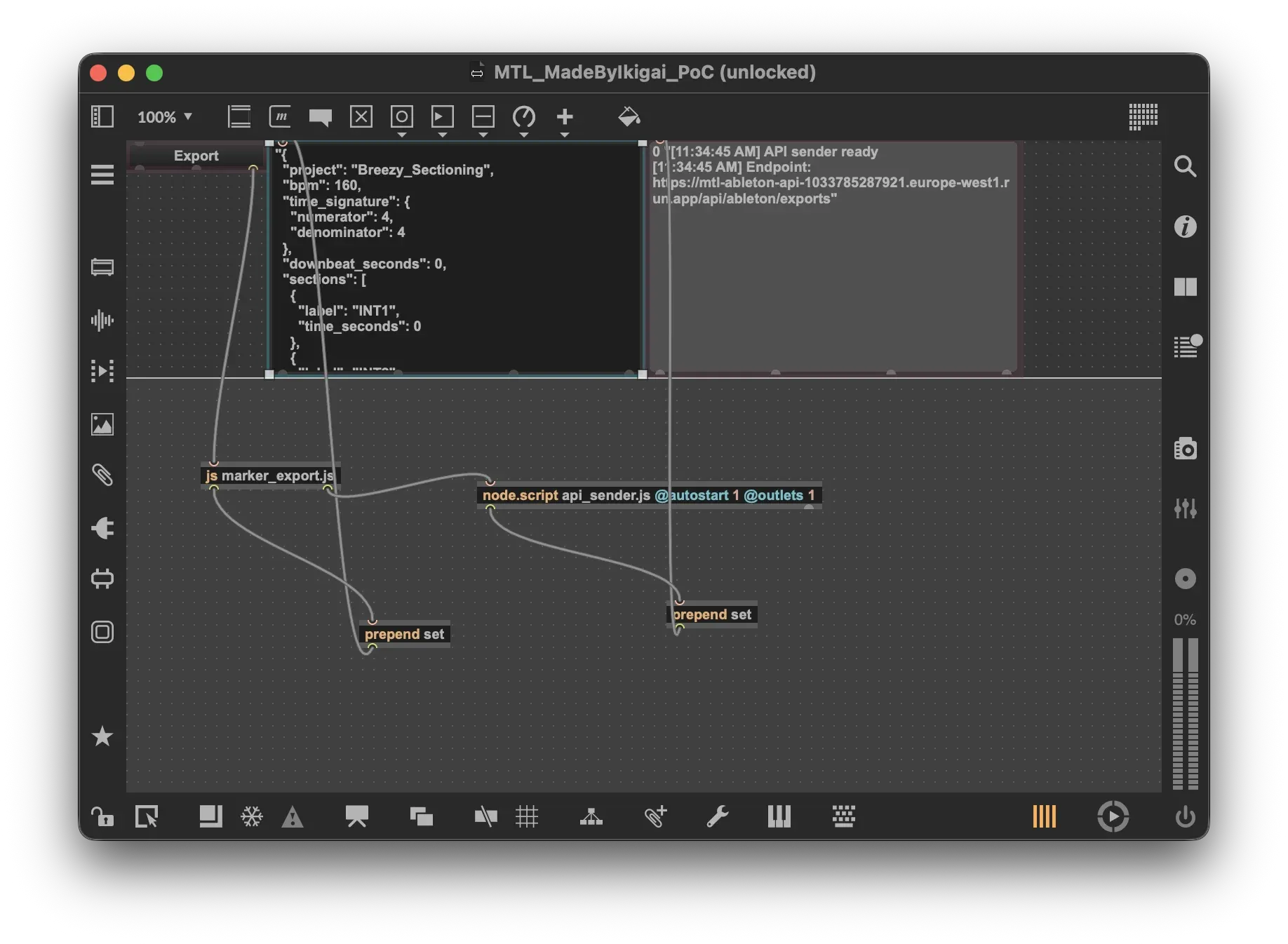
The patcher architecture:
┌─────────────────┐     ┌──────────────────────┐     ┌────────────────┐
│   textbutton    │────▶│  js marker_export.js │────▶│   textedit     │
│    "Export"     │     │                      │     │  (JSON output) │
└─────────────────┘     └──────────┬───────────┘     └────────────────┘
                                   │
                                   ▼
                        ┌──────────────────────────────────────┐
                        │  node.script api_sender.js           │
                        │  @autostart 1 @outlets 1             │
                        └──────────────────┬───────────────────┘
                                           │
                                           ▼
                                 ┌────────────────┐
                                 │   textedit     │
                                 │ (API status)   │
                                 └────────────────┘
The node.script object runs a Node.js script within Max, providing full access to npm packages and modern JavaScript features.
The API Sender (api_sender.js)
The node.script object runs a Node.js script that handles HTTP communication:
// Pseudo-code: api_sender.js

const Max = require('max-api');
const API_URL = "https://your-api.run.app/api/ableton/exports";

Max.addHandler("export", async (jsonString) => {
  // 1. Parse incoming data from marker_export.js
  const payload = JSON.parse(jsonString);

  // 2. POST to API
  const response = await fetch(API_URL, {
    method: 'POST',
    headers: { 'Content-Type': 'application/json' },
    body: JSON.stringify(payload)
  });

  // 3. Handle response
  const result = await response.json();

  if (result.is_duplicate) {
    Max.outlet("status", "Already exported");
  } else {
    Max.outlet("status", "Saved: " + result.id);
  }
});
Why node.script? Unlike Max's built-in JS, node.script provides full Node.js runtime with npm packages, async/await, and modern fetch API.
The API Implementation
The backend is a FastAPI service with PostgreSQL storage:
# Pseudo-code: FastAPI endpoint

@router.post("/ableton/exports")
async def create_export(data: AbletonExportSchema, db: Session):

    # 1. Idempotency check - prevent duplicates
    existing = db.query(Export).filter(
        project == data.project,
        exported_at == data.exported_at
    ).first()

    if existing:
        return { ...existing, is_duplicate: True }

    # 2. Store new export
    export = Export(
        id = uuid4(),
        project_name = data.project,
        bpm = data.bpm,
        sections = data.sections,    # JSON array
        exported_at = data.exported_at
    )

    db.add(export)
    db.commit()

    return { ...export, is_duplicate: False }
Key design decisions:
- Idempotency via unique constraint on
(project_name, exported_at) - Sections stored as JSON for flexibility
- UUID primary keys for distributed systems compatibility
Browser UI: Visualizing Your Exports
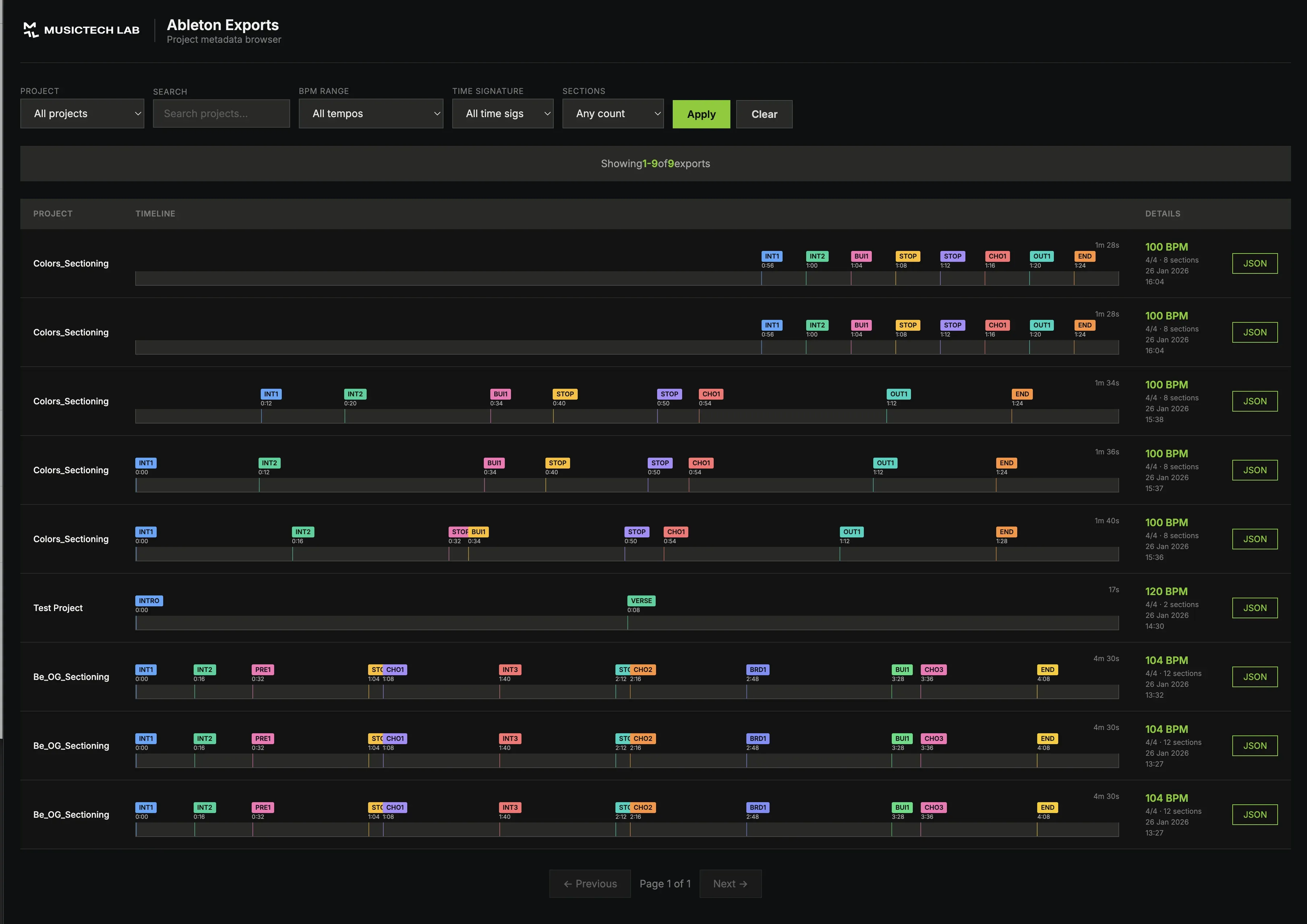
The API includes a browser-based UI at /browser that shows all your exports:
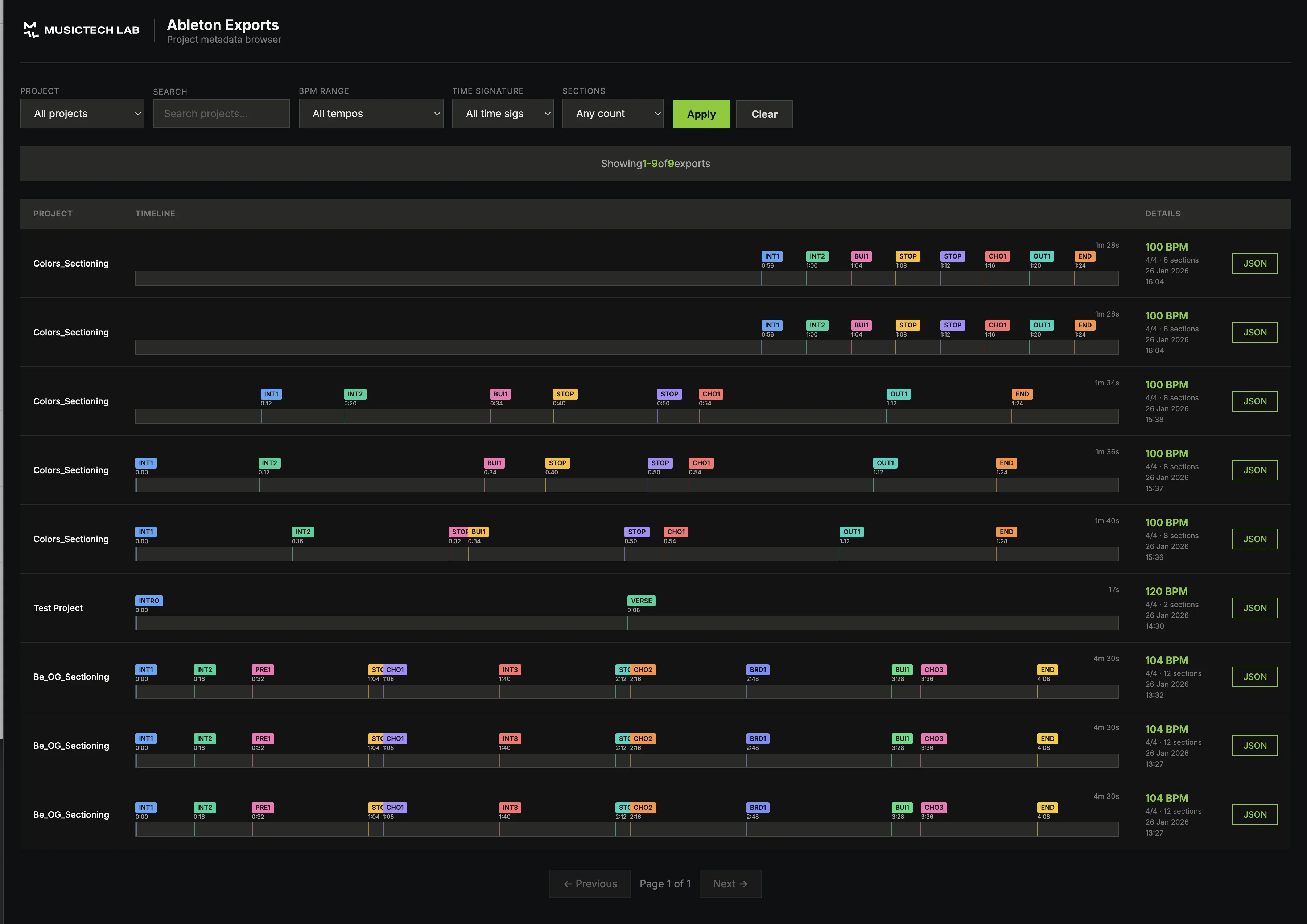
Features
| Feature | Description |
|---|---|
| Timeline visualization | Ableton-style arrangement view |
| Filters | By project, BPM range, section count |
| Search | Find exports by name |
| Pagination | Handle large export histories |
| JSON inspection | Click to see full export data |
Timeline Rendering
Each export is visualized as a horizontal timeline with color-coded sections:

The visualization is generated client-side using vanilla JavaScript and CSS Grid, making it lightweight and fast.
Additional API Endpoints
GET /api/ableton/exports
List all exports with pagination and filtering:
curl "https://api.example.com/api/ableton/exports?project=my_track&page=1&limit=20"
GET /api/ableton/exports/{id}
Get a specific export by ID:
curl "https://api.example.com/api/ableton/exports/550e8400-e29b-41d4-a716-446655440000"
GET /api/ableton/projects
Get list of all unique project names:
curl "https://api.example.com/api/ableton/projects"
Response:
{
  "projects": ["my_track", "remix_v2", "collab_final"]
}
Deployment
The API runs on Google Cloud Run with Cloud SQL (PostgreSQL):
| Component | Service |
|---|---|
| API | Cloud Run (serverless containers) |
| Database | Cloud SQL PostgreSQL |
| Region | europe-west1 |
Local development uses Docker Compose with the same PostgreSQL setup, ensuring dev/prod parity.
Testing the Integration
From Ableton
- Open a project with arrangement locators
- Add the Max for Live device to any MIDI track
- Click "Export"
- Watch the status panel - should show "Saved: uuid"
- Open Browser UI - your export appears in the timeline
Verify with curl
curl "https://your-api.run.app/api/ableton/projects"
# Returns: { "projects": ["your_project_name", ...] }
Security Considerations
For a production deployment, consider:
| Concern | Solution |
|---|---|
| Authentication | Add API keys or OAuth |
| Rate limiting | Prevent abuse |
| CORS | Restrict allowed origins |
| Input validation | Already handled by Pydantic |
| HTTPS | Enforced by Cloud Run |
What's Next?
This pipeline enables several advanced workflows:
- AI comparison - Compare manual annotations with AI-detected structures
- Cross-DAW sync - Export from Ableton, import to REAPER/Logic
- Version tracking - See how your arrangement evolved over time
- Team collaboration - Share structure data with collaborators
- Automated processing - Trigger downstream tasks on new exports
Related Articles
- Exporting Ableton Live Locators to JSON with Max for Live - Build the Max for Live device
- Automatic Song Structure Analysis – How AI Detects Intro, Verse, and Chorus - AI-powered structure detection
Conclusion
By connecting your Max for Live device to a cloud API, you transform Ableton from an isolated creative tool into a node in a larger data pipeline. Every arrangement decision, every locator you place, becomes structured data that can power visualizations, training datasets, and cross-platform workflows.
The key insight: your DAW is a data source. Treating it that way opens up possibilities that weren't available when everything stayed local.
Two Macs, one Claude Code setup: skills as plugins, not symlinks
I moved 36 Claude Code skills out of 17 tiny repos and a pile of symlinks into two plugins, one public and one private, with a make pull on the other machine. Here is what changed and why.
Dev Meeting 002: Intro to DDD
My notes from an introduction to Domain-Driven Design (DDD), an approach to software development that models business domains for more effective and maintainable systems.