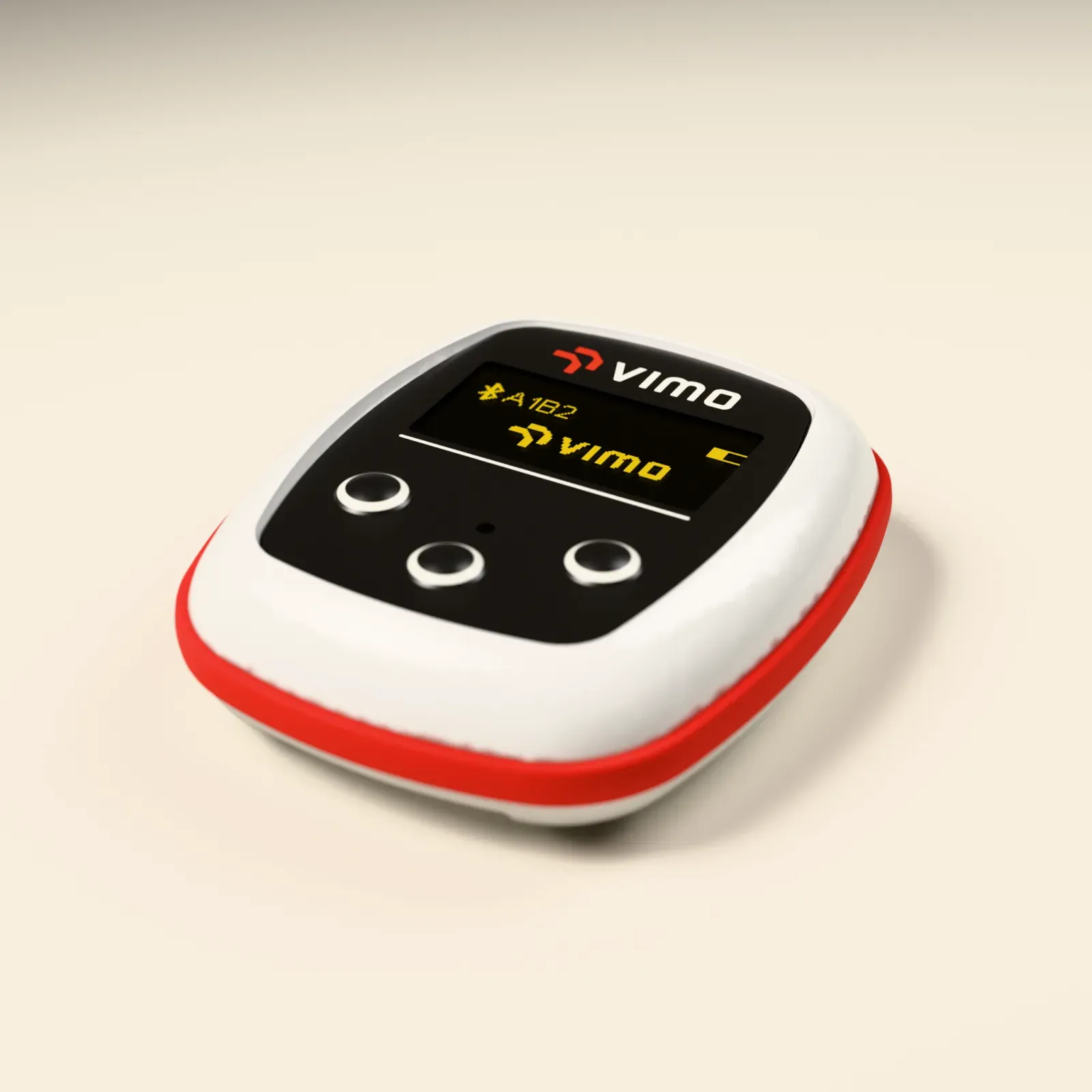
A product render of Vimo Swim in one evening with Blender and MCP
On October 25 I pointed Claude Code at Blender through the MCP add-on, gave it the CAD files of the Vimo Swim device and a brief, and by midnight the exploded-view animation was on vimoswim.com. What the workflow looked like, where it measured wrong, and the one rule that made it reproducible.
At 21:02 on October 25 I asked Claude Code whether it could see Blender. At 00:19 the next morning an exploded-view animation of the Vimo Swim device, rendered from the real enclosure and PCB CAD, was live on vimoswim.com. In between: 67 Python snippets executed inside Blender, 20 viewport screenshots, a few measurement mistakes that I caught by eye, and a build script that can rebuild the whole scene on another machine. This is how that evening went and what I would keep.
The setup is three commands and one gotcha
Blender 5.0.1 was already running with the MCP for Blender add-on listening on port 9876. Claude Code still could not see it. The server had been registered at local scope from my home folder, so the project folder did not inherit it. The fix was to register it for the user:
brew install uv
claude mcp add --scope user blender -- uvx blender-mcp
After that the first call to the add-on came back with Blender 5.0.1, add-on 1.8, the default cube, and every asset library and generator switched off. Poly Haven, which I wanted for a studio HDRI, is a per-scene checkbox in the viewport sidebar, not a preference. Claude flipped it from code with blendermcp_use_polyhaven = True after I said I could not see it.
The brief did the heavy lifting
I did not ask for "a nice render". I pasted a brief that reads like a job description for a 3D technical director: inputs, deliverables, hard rules, phases. The inputs were the real parts:
- the enclosure as STEP with its technical drawing
- the PCB as STEP with top and bottom photos
- the display glass and the decor foil as STEP and DXF
- brand tokens: Vimo Red, Navy, Warm Cream, the logo SVG, Oswald and Inter
The hard rules are the part worth copying. Import the CAD, do not remodel it. Assert the enclosure bounding box after import and print it before moving on. Never transform or delete an imported object; render-only changes live on duplicates. Materials from brand tokens only. Eevee for every iteration, Cycles only for finals after I approve the previews. And the one that paid off most: every change made through MCP must also land in build.py, a script that rebuilds the scene headless.
The brief ended with three questions and defaults. Claude asked them, I answered: Vimo Red strap, logo only, metric text on the display, and OpenCascade through uv for the STEP conversion.
Phase 0: Blender has no STEP importer
The first thing the process found was a gap. Blender 5 cannot read STEP and FreeCAD was not installed. Instead of hand-modelling, Claude wrote a small converter that runs OpenCascade in an isolated environment and writes an OBJ with one named group per solid:
uv run --python 3.12 --with cadquery-ocp tools/step2obj.py \
  cad/enclosure.step mesh/enclosure.obj --angle 0.15 --deviation 0.005
Four files went through it: enclosure, PCB, glass, foil. The OBJ files are git-ignored and regenerated; a small JSON report next to each keeps the solid list and sizes, so the bounding-box assertion in the brief has something to check against.
Phases 1 to 3: import, materials, foil and display
From 21:33 to 22:11 the scene went from empty to a device. Import with an interference check, brand materials, then the foil artwork with the logo, the OLED window and the three button domes. The display does not show a mock-up. A helper takes the firmware's own home-screen screenshot, scales it to the native 128 x 64 pixels and re-blits the Bluetooth rune from the firmware bitmap, so the render shows what the real device shows.
This is also where my eyes earned their keep. The OLED cut-out was measured wrong the first time. The logo overlapped the display and had to move up to leave a 1.1 mm gap. Dark wedges that I flagged as "not part of the product" turned out to be the lid hole cut too wide. None of this was visible in the numbers; all of it was visible in a viewport screenshot.
Ask for a screenshot after every phase and look at it like a customer would. The model can assert a bounding box. It cannot tell that the logo is sitting on the display.
A side quest: the simulator gets a GLB
At 22:13 the project became a repo, and before lighting even started the model was exported for the web simulator: a Draco-compressed GLB of 0.51 MB and 134 thousand triangles, in millimetres, with the parts named the way the simulator's own export prompt expects. That hand-off now lives in build.py as a flag, so the simulator model is a by-product of the same source, not a second model.
Phases 4 and 5: studio and cameras
The studio is a cream backdrop, the Poly Haven studio_small_09 HDRI at low strength and three area lights. The HDRI did not come through the asset tool; a small fetch script downloaded it, and it got a 403 until it sent a User-Agent header. Then came the first lighting pass, with wattages about 25 times too high, and a Blender-side error about reshaping an array of 6,553,600 values into a shape of zero. The view transform moved from AgX to Khronos PBR Neutral, so the white case reads as white against the cream rather than grey. My note at that point was two words: looks great.
One more visual bug: the render had what looked like dust around the sealing ring. Those were Eevee artefacts on the ring geometry, fixed with weighted normals and by turning off screen-space ray tracing. Six cameras followed, each with a transparent and a cream variant.
Phase 6: the exploded view, then the animation
I skipped the strap and the wrist shot and asked for the exploded view straight away. Top, foil, glass, PCB, ring and bottom spread along Z, driven by parented empties per layer so the source objects never move. From 23:17 to 00:07 that became an animation: 166 frames at 1080 x 1080, first as H.264, then as a transparent WebM.
Two things broke on the way. Blender 5 no longer offers FFmpeg in the image format list, so frames are rendered as PNG and stitched with ffmpeg outside Blender. And the Cycles glass material vanished every time the file was saved, because nothing referenced it yet; it needed a fake user to survive. At 00:19 the WebM was embedded at vimoswim.com/exploded through a website pull request.
Every one of these fixes went into build.py the same evening. The script is now 3,167 lines and rebuilds the scene headless with Blender -b -P build.py. The live MCP session is where you experiment; the script is what you keep.
The next day: a second Mac
On October 26 I wanted the renders from a faster machine. Claude wrote a paste-ready setup task for the second Mac: install Blender, the MCP add-on, uv, ffmpeg and gh, register the server, rebuild the scene from source. The first rebuild there came up without the display. I reported it as a missing commit; it was a hard-coded path in the blend file. After the fix the build was verified on Blender 5.0.1 and 5.2.3, and the Cycles hero renders came back from the second Mac that day. Later commits that week added an upright turntable as a looping WebP, a box render with a back label and a 60 fps version of the exploded animation.
What the evening cost and what I would keep
Numbers from the session log: 67 code executions inside Blender, 20 screenshots, 244 shell commands around them, two errors from the Blender side. Seventeen commits between October 25 and 29.
What I would keep, in order:
- A written brief with hard rules. The rules about not remodelling CAD and asserting dimensions are what made the result trustworthy. Without them a model will happily "fix" an interference by nudging a part.
- The script-first rule. Every MCP change also lands in a rebuild script, and the headless rebuild is the test. The second Mac proved it within a day.
- Eyes on every phase. The measurement mistakes were small, obvious to a human and invisible to the model. A screenshot per phase is cheap.
- Expect tooling gaps, not modelling gaps. The hard parts were STEP import, an HDRI download, a missing FFmpeg option and a material without a user. None of them were about 3D.
What I would do differently: run the first lighting pass at a fraction of the wattage and scale up, and put the fake-user rule for engine-specific materials in the brief, so nobody loses a glass material twice.
BeatBuddy Replay: Video Analysis App Challenges
A deep-dive into how I built a Flutter video analysis app for swimmers. From MVP architecture to cross-platform challenges - my lessons from two weeks of development.
Building a Claude Skill for DDEX Validation: Automate Music Metadata Checks with AI
A step-by-step guide to creating a Claude Code skill that validates DDEX ERN XML files against official schemas - catching metadata errors before they reach distributors.